In short
What is checked
whether resources loaded from other domains declare the integrity attribute.
What it protects
it stops a file altered on the provider’s server from running inside your website.
Severity in Wakaris
Important. It appears on 89% of the pages analyzed.
Essential requirement
besides the cryptographic hash, the tag needs crossorigin.
What this finding is and what it measures
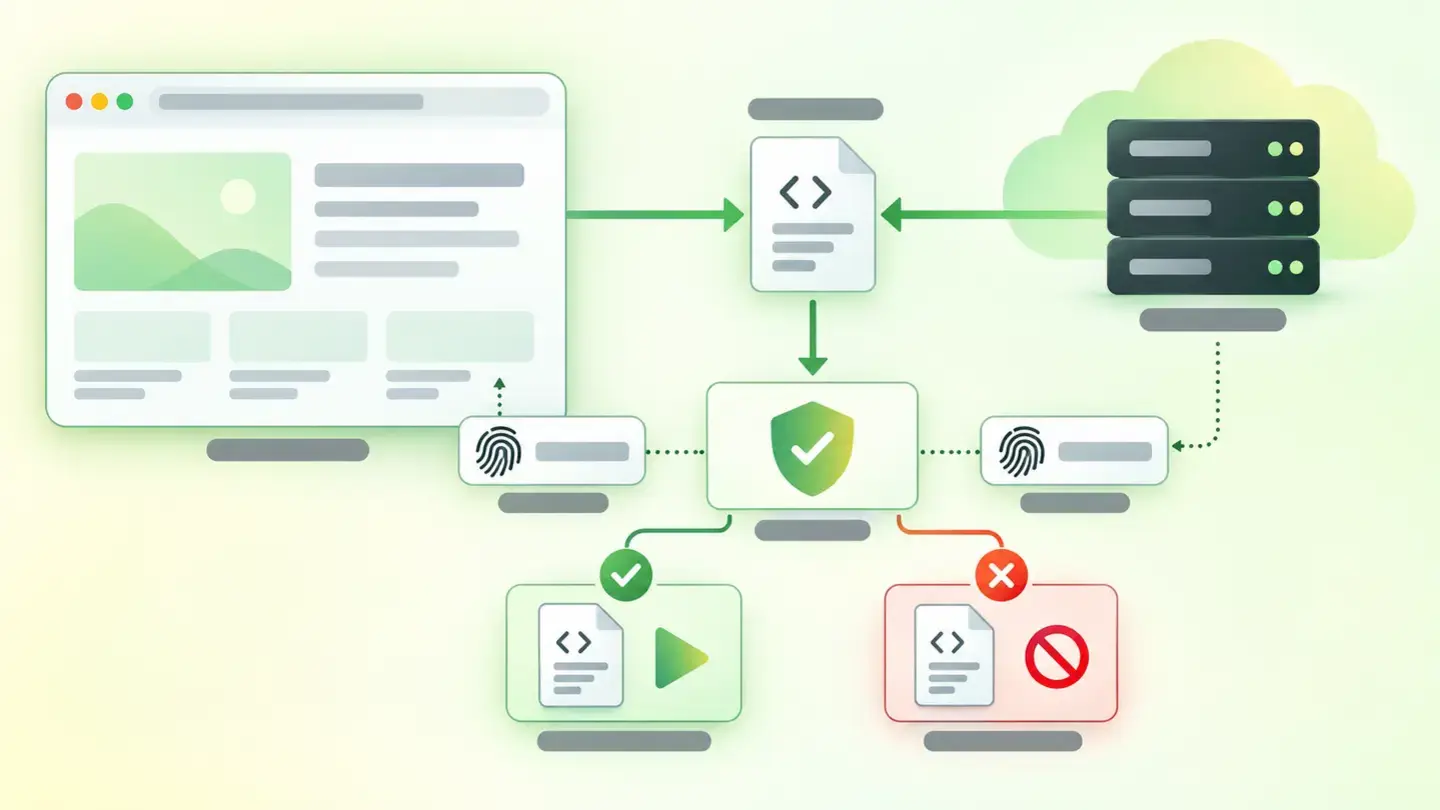
This finding shows up when your page loads a resource hosted on another domain —usually a script or a stylesheet served from a content delivery network— without declaring the integrity attribute on the tag that calls it.
That attribute is the core of Subresource Integrity, a standard browser mechanism. MDN’s documentation defines it as a security feature that lets the browser verify that the resources it downloads arrive without unexpected manipulation, by comparing them with a cryptographic hash you declare in advance.
Without that hash, the relationship with the external provider is pure trust: you accept whatever their server sends back, today and any other day. With it, the browser checks the content before running it and refuses if it isn’t exactly what you expected. Wakaris marks this finding with Important severity.
How it is checked
Wakaris goes through the HTML of the URL you give it, finds the tags that load resources from an external origin and checks whether each one declares the integrity attribute. If it finds one without it, it returns the finding with the analyzed page and the specific code fragment that causes it. It’s a presence check, not a measurement: the result is that there are unverified resources, or that there aren’t.
It’s worth knowing which elements the standard applies to, because it isn’t all of them. According to MDN, Subresource Integrity works with <script> elements and with <link> elements whose rel attribute is stylesheet, preload or modulepreload. Images, iframes and resources a script loads on its own later are outside the attribute’s scope.
There’s a second condition that surprises many people: the W3C specification requires cross-origin requests that use integrity to go through CORS, so the tag also needs crossorigin.
Why it matters
The risk isn’t theoretical and the surface is huge. Using HTTP Archive data, Chrome’s developer documentation puts the share of websites using third-party resources at more than 94%, with an average of about 21 different providers per page. Each one is a server you don’t control running code in your visitor’s browser.
The W3C specification explains why HTTPS isn’t enough: those mechanisms authenticate only the server, not the content, and an attacker with access to the server can manipulate the content with impunity. And it adds the principle that sums up the threat: a compromised third-party service shouldn’t automatically mean that every site including its scripts is compromised.
OWASP puts it from the other side, in its guide to managing third-party JavaScript: the biggest risk is that the provider’s server is compromised and malicious code is injected into the original tag. Whoever has that access can read forms, steal sessions or redirect payments from inside your own page.
Common causes
It’s almost never a conscious decision: it’s what comes by default. The causes repeat in four forms.
The first is copying and pasting the installation snippet the provider gives you. Many publish it without integrity, precisely because they want to be able to change the file whenever it suits them.
The second is linking to a moving path, like /ultima/libreria.js, instead of a fixed version. A file that changes on its own can’t have a fixed hash, so the attribute is incompatible with that way of linking.
The third is that the provider doesn’t support CORS. If its server doesn’t send the necessary headers, the tag with integrity and crossorigin will stop the resource from loading, and the easy way out of a broken website is to remove the attribute instead of changing provider.
The fourth is plugins and templates in content management systems, which insert their own tags pointing to external servers without anyone reviewing or counting them.
How to fix it
The order matters, because not every external resource deserves the same treatment. Wakaris gives you the list of unverified tags and the exact fragment for each one.
First, decide which resources are still needed: the cheapest way to remove a third-party risk is to stop loading the resource.
Second, pin the version: replace moving paths with a specific, immutable version, because without that no hash will hold.
Third, calculate the hash and add it. The standard supports sha256, sha384 and sha512, and MDN ranks them from weakest to strongest in that same order. Any command-line utility that calculates a base64 SHA-384 hash will do. Put the value in integrity and always pair it with crossorigin="anonymous".
Fourth, host anything essential on your own domain. If the page doesn’t work without that resource, serving it yourself removes the dependency.
And check the result: if the hash doesn’t match, the browser refuses to load the resource and returns a network error. Run the page through Wakaris again to confirm the finding is gone.
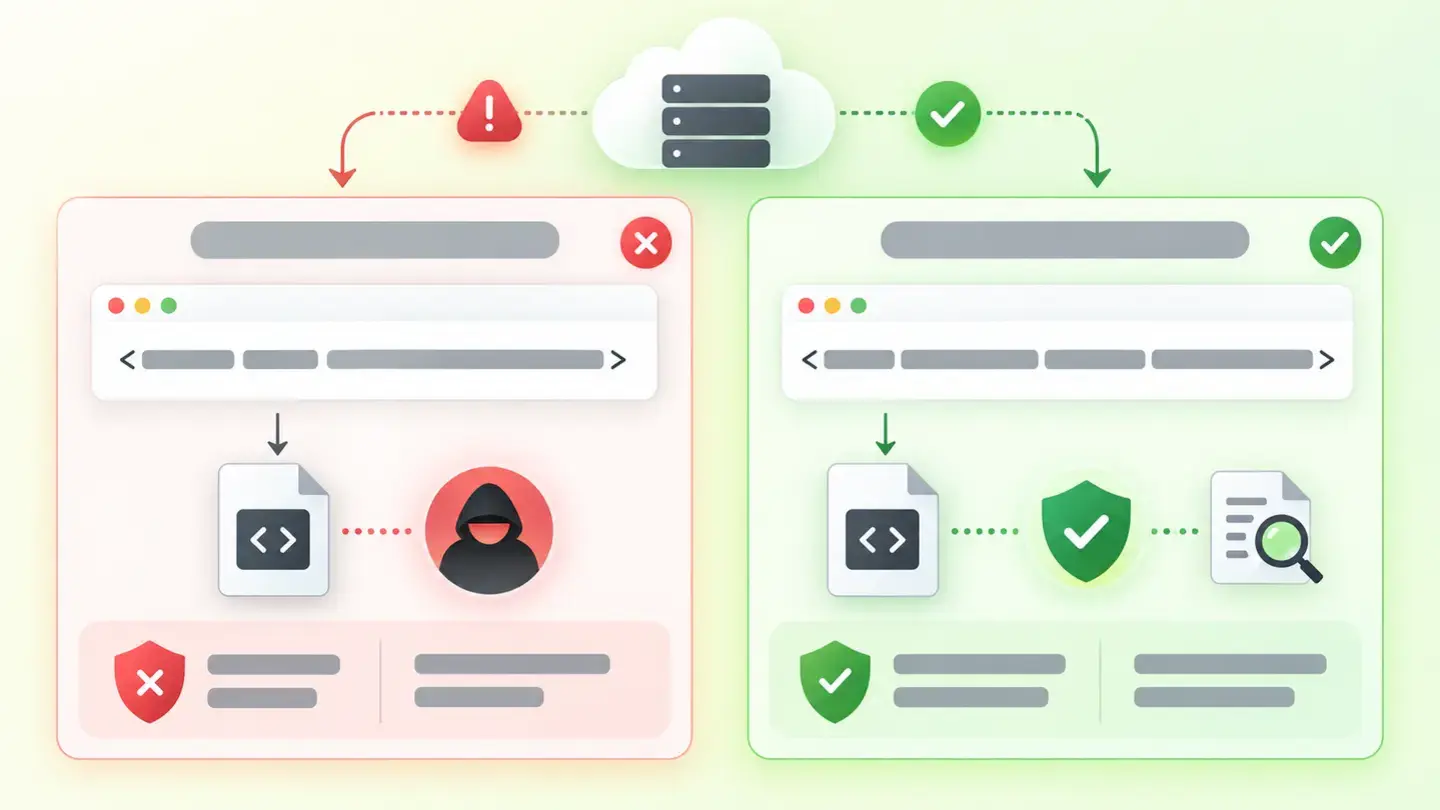
Comparison of a script tag without the integrity attribute and the same tag with integrity and crossorigin declared
Brief to generate the image
Editorial illustration for a Wakaris technical guide.
Topic: Comparison of a script tag without the integrity attribute and the same tag with integrity and crossorigin declared.
Style: white background with a soft lime→pale green wash (#F8F7D6 → #E2F2DC), green→lime gradient accent (#8ED390 → #DCD86F), near-black ink (#12150B), pill shapes and rounded corners, soft shadows, clean schematic look, no photography.
Format: 16:9, 1440 pixels wide.
No legible text: any label, code or figure is shown as grey placeholder bars. The caption carries the meaning, not the image.
No real logos or third-party brands. No recognizable people.
Tags: resources, third parties, verify, comparison, tag, script, attribute, integrity
Ask your AI
If you want to dig deeper into your specific case, copy one of these two prompts and paste it into the AI you use. Choose based on your situation.
I already have this finding measured with Wakaris and want to fix it
Act as a professional, careful web technical reviewer. Your goal is to help me understand a specific finding about my website and decide what to do about it, without making anything up.

Context: I got this finding with Wakaris, a tool that analyzes a website across 9 areas (performance, SEO, security, social, market, AI, user experience, accessibility and legal) and explains each problem so that everyone on a team can understand it. The finding is: Unverified third-party resources. My page loads scripts or stylesheets hosted on other people’s servers without the integrity attribute, which is the cryptographic hash the browser uses to check that the downloaded file is exactly the one I expected. For reference: any external resource loaded without that attribute counts as a failure.

Paste the Wakaris result here: which external resources it flagged, which domains they come from and on which page. If you don’t have it, tell me and I’ll tell you how to get it before we continue.

Rules you must follow at all times:

1. Don’t assume anything about my website. Every piece of data you use must come from what I confirm to you or from what Wakaris has measured. If you don’t know something, ask me before stating it.
2. Before giving me conclusions, ALWAYS ask me these questions, all together and in plain language, to find out whether this finding really affects me and where:
   a) What platform is your website on? (WordPress, Shopify, custom website, other)
   b) Of the external resources flagged, do you know which ones are still needed and which were left over from a previous version?
   c) Do you link to a specific version of the file or to a generic "latest version" type of path?
   d) Does someone add those resources to the template by hand, or are they inserted by installed plugins and tools?
   e) Is any of them essential for the page to work, or are they extras?
   f) If the template code needs to be changed, would you do it yourself, an in-house technician or an agency?
3. Every statement or recommendation must be justified in relation to MY context, not in general. If you recommend something, explain why it applies to my case.
4. Always state your level of certainty. If something is a hypothesis because you can’t measure it, say so: you can’t see my website, you’re reasoning from what I tell you.
5. Warn me before suggesting risky changes. Adding a wrongly calculated hash, or adding it without CORS, makes the browser block the resource and can leave part of the website not working: it’s best to try it in a test environment first.
6. If you need data that can only be obtained by analyzing the website (which external resources there really are, or whether the fix worked), tell me and recommend that I run the page through Wakaris again: that gets checked, not guessed.
7. The final decision is mine, not yours. Your role is to help me understand and prepare the action, not to decide for me.
8. If the fix is beyond what I can do myself, or a team is going to carry it out, help me get the problem ready to hand over: what it is, where it is, why it matters and what should be done, in an actionable format for that person.

Source of this finding: https://www.wakaris.com/en/guides/security/unverified-third-party-resources
To check it or check it again: https://www.wakaris.com/

Start by briefly introducing yourself in your role and asking me the first block of questions.
I haven’t measured it yet and want to check whether my website has this problem
Act as a professional, careful web technical reviewer. I’m looking into whether my website has a specific problem and I want you to help me find out honestly, without taking it for granted.

Context: I came to this through Wakaris, a tool that analyzes a website across 9 areas (performance, SEO, security, social, market, AI, user experience, accessibility and legal) and explains each problem so that everyone on a team can understand it. The problem I want to look into is: third-party resources loaded without verification. It means my website loads scripts or stylesheets from other people’s servers without the integrity attribute, the cryptographic hash the browser uses to check that the file hasn’t been altered. I DON’T know yet whether my website has it: I want to find out.

Rules you must follow at all times:

1. First and most important: this is checked by looking at my pages’ code, and you can’t analyze my website from this conversation. Make it clear from the start that you won’t be able to give me a definitive "yes, you have it" or "no, you don’t", only a hypothesis based on what I tell you.
2. Don’t assume anything. Before giving me any assessment, ALWAYS ask me these questions, all together and in plain language, to estimate whether I’m likely to have the problem:
   a) Does your website use fonts, icons, animation libraries or maps that come from an external server?
   b) Do you have plugins, purchased templates or chat, review or advertising tools installed?
   c) Do you know whether anyone ever reviewed which external domains your website loads?
   d) What platform is it on? (WordPress, Shopify, custom website, other; or I don’t know)
   e) Who maintains the website’s code today: you, an in-house technician, an agency or nobody in particular?
3. Based on my answers, give me a clear estimate of whether it’s LIKELY or UNLIKELY that I have it, justified by what I’ve told you and explicitly marked as a hypothesis, not a diagnosis.
4. Tell me directly that the only way to really know is to check it, and that I can do it for free and without creating an account by running my website through Wakaris, which will give me the real list of unverified external resources, the specific code fragment and, along the way, the state of the other areas.
5. If I ask you how to check it by hand, don’t hide it from me, but remind me that Wakaris does it faster, on the real page and with additional information I don’t get by hand.
6. If checking shows that I do have it, tell me that the next step is to understand how it affects me and how to fix it in my specific case.
7. The conclusion and the decision are mine, not yours. You help me find my way.

Source of this finding: https://www.wakaris.com/en/guides/security/unverified-third-party-resources
To check it: https://www.wakaris.com/

Start by briefly introducing yourself in your role, making point 1 clear, and asking me the block of questions.
Frequently asked questions
What exactly is the integrity attribute? +
It’s an attribute you put on script and stylesheet tags that contains a cryptographic hash of the file you expect to receive. The browser calculates the hash of what it downloaded and compares them: if they don’t match, it refuses to load it and returns a network error.
Is it any use if the resource already travels over HTTPS? +
Yes, because they protect different things. The W3C specification is explicit: HTTPS authenticates the server, not the content. Anyone with access to the provider’s server can change the file, and your browser will receive it over a perfectly encrypted connection and run it without any objection.
Can I add integrity to any external resource? +
No. The standard covers script tags and link tags whose rel attribute is stylesheet, preload or modulepreload. Images, videos, iframes and whatever a script loads later on its own are left out, and those cases need other protective measures.
What happens if the provider updates its file? +
The hash no longer matches and the browser blocks the resource, so any functionality that depends on it will stop showing. That’s why you should always link to a fixed version and not to a generic path the provider can change without telling you.
Sources cited
- developer.mozilla.orgSubresource Integrity, MDN: definition of the mechanism, supported elements, the sha256/sha384/sha512 algorithms and the CORS requirement.
- w3.orgSubresource Integrity, W3C: HTTPS authenticates the server and not the content; compromising a third party shouldn’t compromise every site that includes it.
- developer.chrome.comCan browsers optimize the loading of third-party resources?, Chrome for Developers: more than 94% of sites use third parties, with an average of 21 providers per page, using HTTP Archive data.
- cheatsheetseries.owasp.orgThird Party JavaScript Management Cheat Sheet, OWASP: the biggest risk is the provider’s server being compromised and code being injected into the original tag.

Updated: September 7, 2026.
This article is part of Wakaris, which analyzes your website across 9 areas and explains each finding so that everyone on your team can understand it.