In short
What happened
five nginx flaws with a severity score of 9.2 out of 10. The main one reaches any nginx with HTTP/2.
What Wakaris checks
whether your server announces an nginx version older than the patched one and offers HTTP/2. Severity: Critical.
Who fixes it
your hosting provider or whoever manages the server. Updating the CMS doesn’t change nginx.
What NGINX2Root is and what Wakaris measures
nginx is the program that receives each visit and delivers the page on a huge number of websites, including many built with WordPress, PrestaShop or Drupal, where it usually works as the front door in front of the application. According to W3Techs, it’s used by 31.3% of the websites whose server is known (September 2026).
On November 18, 2026, nginx released versions 1.30.7 (stable branch) and 1.31.9 (mainline branch), which fix five flaws that the security company Xint, which found them, groups under the name NGINX2Root. F5, the company that develops nginx, gives all five a severity score of 9.2 out of 10. The most widespread one, CVE-2026-123007, has been in the HTTP/2 code since version 1.9.5, from 2015, and according to Xint it lets someone without credentials run commands on the server with nginx’s permissions.
| Flaw | When it applies | Affected versions | Does turning off HTTP/2 stop it? |
|---|---|---|---|
| CVE-2026-123007 · memory corruption in HTTP/2 flow control | With HTTP/2 enabled | 1.9.5 to 1.31.8 | Yes |
| CVE-2026-123633 · freed memory that is still used in HTTP/2 | With HTTP/2 and requests forwarded to an internal server | 1.19.7 to 1.31.8 | Yes |
| CVE-2026-121810 · freed memory that is still used in HTTP/3 | With HTTP/3 and requests forwarded to an internal server | 1.25.0 to 1.31.8 | No |
| CVE-2026-123634 · freed memory that is still used in the resolver | With resolver and a destination that changes depending on the request | 0.6.18 to 1.31.8 | No |
| CVE-2026-113425 · freed memory that is still used in the mail proxy | With nginx’s mail proxy active | 0.5.33 to 1.31.8 | No |
All five are fixed by the same versions, 1.30.7 or 1.31.9, or by the patched package from your Linux distribution. In addition, Xint chained the first one with a separate flaw in the Linux kernel to take full control of the server (root), hence the name.
In Wakaris, the finding appears as “Is your website vulnerable to NGINX2Root?”, belongs to the security area and has Critical severity. It focuses on the two HTTP/2 flaws, which are the ones that reach the most servers and the only ones that leave clues visible from the outside.
How do you check whether NGINX2Root affects your website?
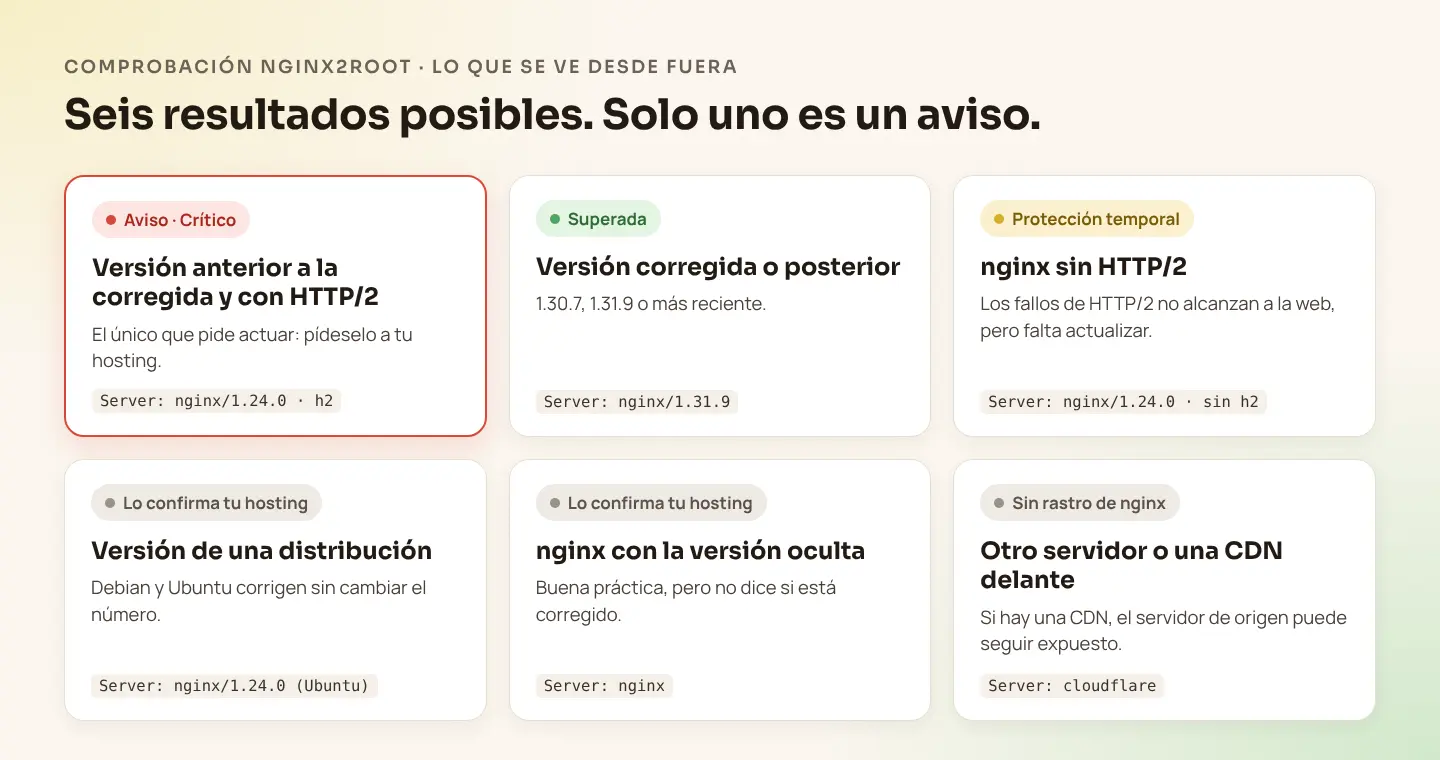
Wakaris checks it from the outside, without sending anything that could affect your server: it reads the Server header your website responds with, where many nginx servers state their version (for example, Server: nginx/1.24.0), and looks at whether it offers HTTP/2 when connecting. With that, it gives one of these six results.
- Version older than the patched one, with HTTP/2. You’ll see a Critical warning with the version and the page analyzed. It’s the only result that calls for action, and the next step is to ask your hosting provider for the fix.
- Patched version or later. The check is passed.
- nginx without HTTP/2. The two HTTP/2 flaws don’t reach the website even if it isn’t updated. It’s a temporary protection, not the fix.
- Version from a Linux distribution. Debian or Ubuntu fix nginx without changing the number it shows, so there’s no way to tell from the outside. Your hosting provider confirms it.
- nginx with the version hidden. That’s good practice and isn’t penalized, but it doesn’t say whether it’s patched either. Your hosting provider confirms it.
- No trace of nginx. The website may use another server, may hide it, or may be behind a content delivery network (CDN), such as Cloudflare, which responds in its place.
Note: Wakaris says your website declares an older version, not that it’s vulnerable. And if your website is behind a CDN, what’s seen from the outside is the CDN: the nginx on your origin server can still be exposed if it accepts direct connections. In both cases, your hosting provider is the one who can confirm it.
If this is the only thing you want to know, there’s the free NGINX2Root checker.
Why does an unpatched nginx matter?
It matters for three reasons. The first is the reach. Xint showed that, with CVE-2026-123007, someone without credentials can run commands on the server with nginx’s permissions and that, by chaining it with a Linux kernel flaw, they can take full control of the server, even breaking out of a Docker container. nginx sees everything that goes in and out of the website: forms, orders, customer accounts.
The second is that it leaves little trace. According to Xint, the attack uses HTTP/2 control messages that don’t show up as visits in nginx’s logs, so looking at those logs isn’t enough to know whether someone tried it.
The third is the shop window. Announcing the exact version doesn’t create the flaw, but it saves work for anyone combing the internet for servers that haven’t been updated. On November 10, 2026, Xint counted 56.7 million nginx servers on Shodan; of those that showed their version, 98.9% were within the affected range. Hiding the version doesn’t protect you on its own; what protects you is updating.
Common causes: why are so many nginx servers still unpatched?
The first cause is that the number is misleading. Debian and Ubuntu fix nginx without changing its version: Ubuntu 22.04 still says 1.18.0 with the patch applied, because what changes is the full package number. A server can look old while being up to date, and the other way around.
The second is that installing isn’t enough without a restart. Xint points out that reloading the configuration doesn’t replace the program that’s already running: until nginx is restarted, the old version keeps serving requests.
The third is thinking that nginx gets updated along with the website. Updating WordPress, PrestaShop or Drupal keeps the application up to date, but not the server that delivers it, which your hosting provider manages.
The fourth is containers pinned to a version: a Docker image with a specific tag stays on the old nginx until someone changes the tag and recreates the container.
The fifth is that nobody is assigned the task, and between the agency, the hosting provider and the business, the server ends up in no man’s land.
How to fix it: what to ask your hosting provider
The fix is to update nginx to 1.30.7 or 1.31.9, or a later version, or install the patched package from your distribution, and restart nginx. You don’t have to do it yourself: you have to ask for it in writing, with exactly the right details.
| System | Version nginx shows | Patched package |
|---|---|---|
| Debian 13 | 1.26.3 | 1.26.3-3+deb13u11 |
| Debian 12 | 1.22.1 | 1.22.1-9+deb12u11 |
| Ubuntu 26.04 LTS | 1.28.3 | 1.28.3-2ubuntu1.13 |
| Ubuntu 24.04 LTS | 1.24.0 | 1.24.0-2ubuntu7.20 |
| Ubuntu 22.04 LTS | 1.18.0 | 1.18.0-6ubuntu14.23 |
| Ubuntu 20.04, 18.04 and 16.04 | 1.18.0, 1.14.0 and 1.10.3 | Only with Ubuntu Pro |
| nginx from nginx.org or the official Docker image | Whichever applies | 1.30.7, 1.31.9 or later |
For Red Hat, AlmaLinux, Rocky, Alpine and the rest, the information is in each distribution’s security advisory.
If it can’t be updated right away, the temporary measure is to turn off HTTP/2 on the server. The website keeps working over HTTP/1.1, perhaps a little slower, but the measure only stops two of the five flaws and is no substitute for updating. Once nginx is patched, HTTP/2 has to be turned back on.
If you manage the server yourself
Check the version, whether nginx has the HTTP/2 module and whether it’s enabled:
nginx -v
nginx -V 2>&1 | grep -o with-http_v2_module
sudo nginx -T 2>/dev/null | grep -nE "listen.*http2|http2 on"
Update with your system’s package manager (or switch to a patched tag if you use Docker), confirm that the package includes the fix and restart. Reloading isn’t enough:
# Debian / Ubuntu
sudo apt update && sudo apt install --only-upgrade nginx
apt changelog nginx | grep CVE-2026-123007

# RHEL / AlmaLinux / Rocky
sudo dnf update nginx

# Check the configuration and restart
sudo nginx -t && sudo systemctl restart nginx
If you can’t update yet, turn off HTTP/2 in every server block that has it, check the configuration and restart:
# nginx 1.25.1 or later
http2 off;

# Earlier versions: remove "http2" from the listen line
listen 443 ssl;   # before: listen 443 ssl http2;
The other three flaws depend on specific features. If you use HTTP/3 and don’t need it, turn it off until you update. If you use resolver with a proxy_pass that contains variables, Xint recommends pointing it at a fixed group of servers in the meantime. If you use nginx’s mail proxy, update before anything else. And for the kernel flaw, which still has no public fix, the interim measure noted by Cloudflare Radar is to block the SCTP module on servers that don’t use it.
After updating: did anyone get in?
Updating closes the door, but it doesn’t tell you whether anyone got in while it was open. Among other checks, Xint suggests two: whether any nginx process has started other programs, which is the clearest sign of a successful attack, and whether there have been abnormal nginx crashes in the last few days. If someone else runs your website, ask them to check it. Once they confirm the change, run your page through Wakaris again.
The email for your hosting provider, ready to copy
Replace the brackets, add the version your website declares according to Wakaris if you have it, and send it from the email address you used to sign up for the hosting.
Subject: nginx fix for NGINX2Root (CVE-2026-123007 and CVE-2026-123633)

Hello,

I’m the person responsible for the website [domain], hosted on your service under the username or contract [identifier].

On November 18, 2026, nginx released fixes (versions 1.30.7 and 1.31.9) for the flaws known as NGINX2Root, including CVE-2026-123007 and CVE-2026-123633, which affect servers with HTTP/2. Please confirm in writing:

1. Whether the server that delivers my website uses nginx, directly or in front of another server, and which exact version or package it has.
2. Whether that version already includes the fix and whether nginx has been restarted after installing it; if not, when it will.
3. Whether you have applied any temporary measures in the meantime, such as disabling HTTP/2 or HTTP/3.
4. Whether you have checked if there was any suspicious activity on the server before the fix was applied.

If you need me to do anything on my side, tell me exactly what.

Thank you,
[name and phone]
If your website is behind Cloudflare or another CDN, add a line asking them to also confirm the nginx on the origin server.
Ask your AI
If you want to dig deeper into your specific case, copy one of these two prompts and paste it into the AI you use. Choose based on your situation.
I already have this finding measured with Wakaris and want to fix it
Act as a professional, careful web systems technician. Your goal is to help me understand a specific finding about my website and decide what to do about it, without making anything up.

Context: I got this finding with Wakaris, a tool that analyzes a website across 9 areas (performance, SEO, security, social, market, AI, user experience, accessibility and legal) and explains each finding so that everyone on a team can understand it. The finding is: "Is your website vulnerable to NGINX2Root?". My server announces in its Server header an nginx version older than the first one that fixes the NGINX2Root flaws (CVE-2026-123007 and CVE-2026-123633, published on November 18, 2026) and offers HTTP/2.
For reference: the patched versions are 1.30.7 (stable) and 1.31.9 (mainline). Debian and Ubuntu publish patched packages that keep the old version number. Turning off HTTP/2 is a temporary measure that only stops two of the five flaws.

Rules you must follow at all times:

1. Don’t assume anything about my website. Every piece of data you use must come from what I confirm to you or from what Wakaris has checked. If you don’t know something, ask me before stating it.
2. Before giving me conclusions, ALWAYS ask me these questions, all together and in plain language, to find out whether this finding really affects me and where:
a) Paste the Wakaris result: the nginx version your website declares, whether it offers HTTP/2 and the page analyzed. If you don’t have it, analyze your website with Wakaris first and come back with the result.
b) What kind of hosting do you have: a hosting plan with a control panel, a server managed by your agency or a server you manage yourself?
c) If you know, what system does the server run (Debian, Ubuntu, Red Hat, Docker, other) and where does nginx come from (system packages, nginx.org, Docker image)?
d) Is your website behind Cloudflare or another CDN?
e) Have you already written to your hosting provider? If they replied, what did they say?
f) If an update is needed, would your hosting provider, your agency or you do it? If an answer calls for it, add a follow-up question, but never skip the ones above or move on to conclusions without having them answered.
3. Every statement or recommendation must be argued with respect to MY context, not in general. If you recommend something, explain why it applies to my case.
4. Always flag your level of certainty. You can’t see my server. Also remind me that an old declared version doesn’t always mean the fix is missing, because Debian and Ubuntu apply it without changing the number: my hosting provider is the one who confirms it.
5. Don’t ask me to touch the server configuration if I don’t manage it. Turning off HTTP/2 is the job of whoever manages the server, it’s temporary and it’s no substitute for updating.
6. If I manage the server myself, remind me that after updating, nginx has to be restarted (reloading isn’t enough) and HTTP/2 turned back on if it had been turned off.
7. If you need to confirm which version my website declares now, or whether the change worked, tell me and recommend that I run the page through Wakaris again: that gets checked, not guessed.
8. The final decision is mine, not yours. If someone else is going to do the fix, help me get it ready to hand over: what it is, where it is, why it matters and what should be requested.

Source of this finding: https://www.wakaris.com/en/guides/security/nginx-vulnerability-2026-nginx2root
To check it or check it again: https://www.wakaris.com/en

Start by briefly introducing yourself in your role and asking me the first block of questions.
I haven’t measured it yet and want to check whether my website has this finding
Act as a professional, careful web systems technician. I’m looking into whether my website has a specific finding and I want you to help me find out honestly, without taking it for granted.

Context: I came to this through Wakaris, a tool that analyzes a website across 9 areas (performance, SEO, security, social, market, AI, user experience, accessibility and legal) and explains each finding so that everyone on a team can understand it. What I want to look into is: "Is your website vulnerable to NGINX2Root?". It means my server uses an nginx version older than the one that fixes the NGINX2Root flaws (CVE-2026-123007 and CVE-2026-123633, published on November 18, 2026; patched versions: 1.30.7 and 1.31.9) and has HTTP/2 enabled. I DON’T know yet whether my website has it: I want to find out.

Rules you must follow at all times:

1. First and most important: this is CHECKED by reading my server’s actual response, and you can’t do that from this conversation. Make it clear from the start that you won’t be able to give me a definitive "yes, you have it" or "no, you don’t", only a hypothesis based on what I tell you.
2. Don’t assume anything. Before giving me any assessment, ALWAYS ask me these questions, all together and in plain language, to estimate whether I’m likely to have the finding:
a) Do you know whether your website is served with nginx? (yes, no, I don’t know)
b) What kind of hosting do you have: a hosting plan with a control panel, a server managed by your agency or a server you manage yourself?
c) Do you know when the server was last updated?
d) Is your website behind Cloudflare or another CDN?
e) Has your hosting provider warned you about anything related to nginx in the last few days?
3. With my answers, give me a clear estimate of whether it’s LIKELY or UNLIKELY that I have it, argued according to what I’ve told you and explicitly marked as a hypothesis, not a diagnosis.
4. Tell me directly that the way to know which nginx version my website declares and whether it offers HTTP/2 is to check it, and that I can do it for free and without creating an account by running my website through Wakaris, which will tell me what it announces and, along the way, the state of the other areas. If my website doesn’t announce the version, Wakaris will tell me so and the confirmation will be up to my hosting provider.
5. If I ask you how to check it by hand, don’t hide it from me, but remind me that Wakaris does it faster, on the real page and with additional information.
6. Remind me that the definitive confirmation of whether I have the fix comes from my hosting provider, that Debian and Ubuntu apply it without changing the version number, and that updating WordPress, PrestaShop or Drupal doesn’t update nginx.
7. The conclusion and the decision are mine, not yours. You help me find my way.

Source of this finding: https://www.wakaris.com/en/guides/security/nginx-vulnerability-2026-nginx2root
To check it: https://www.wakaris.com/en

Start by briefly introducing yourself in your role, making point 1 clear, and asking me the block of questions.
Frequently asked questions
What is NGINX2Root? +
It’s the name the security company Xint gives to five nginx flaws published on November 18, 2026, plus one in the Linux kernel that it chained them with. The main one, CVE-2026-123007, affects any nginx with HTTP/2 since version 1.9.5 and can allow commands to run on the server without credentials. They are fixed by updating nginx to 1.30.7, 1.31.9 or the patched package from your distribution.
If my website declares an old nginx version, is it already vulnerable? +
Not necessarily. Debian and Ubuntu apply the fix without changing the number nginx shows, and if HTTP/2 is turned off the two main flaws don’t reach the website. It doesn’t mean anyone has broken in either. It does mean you should ask your hosting provider today which version or package it serves and whether it includes the fix.
Does updating WordPress or PrestaShop fix NGINX2Root? +
No. WordPress, PrestaShop and Drupal are applications, and nginx is the server that delivers them. Updating them doesn’t change nginx, which is managed by your hosting provider or whoever manages the server.
How do I know whether my website uses nginx and which version it has? +
Many websites say so in the Server header of their responses, which is what Wakaris reads. If they don’t, your hosting provider knows the version; if you manage the server yourself, nginx -v shows it. In Debian and Ubuntu, what matters is the full package number, not just the version.
Is turning off HTTP/2 enough? +
No. Turning off HTTP/2 stops CVE-2026-123007 and CVE-2026-123633, but not the other three flaws, and it’s a temporary measure. The website keeps working over HTTP/1.1, perhaps a little slower. The definitive fix is to update nginx, restart it and turn HTTP/2 back on.
My website is behind Cloudflare, so is it already safe? +
Not necessarily. What’s seen from the outside is the CDN, not your server. If the nginx on your origin server accepts direct connections with HTTP/2, it can still be exposed. Ask your hosting provider to confirm the version on the origin server.
Sources cited
- nginx.org nginx security advisories, nginx.org: the five flaws, their severity, affected and patched versions.
- xint.io NGINX2Root: New Remote Code Execution Vulnerabilities in nginx, Xint: what they allow, when they apply, Shodan data, temporary measures and signs of an attack.
- radar.cloudflare.com Zero Wire: nginx2root, Cloudflare Radar: severity according to F5, exploitation status and the kernel flaw.
- security-tracker.debian.org CVE-2026-123007, Debian: patched packages for Debian 12 and 13.
- ubuntu.com CVE-2026-123007, Ubuntu: patched packages by Ubuntu release.
- w3techs.com Usage of web servers, W3Techs: nginx usage.

Updated: November 20, 2026.
This article is part of Wakaris, which analyzes your website across 9 areas and explains each finding so that everyone on your team can understand it.