In short
What is checked
whether your domain publishes SPF and DMARC, and whether what they publish is any use.
What it protects
against someone sending email impersonating your domain to your customers or your own team.
Severity in Wakaris
Important. It appears on 80% of the domains analyzed.
Common trap
having DMARC in monitoring mode and thinking it’s already sorted.

What this finding is and what it checks
Your domain doesn’t just serve a website: it’s also the sender of your emails. The protocol email travels on doesn’t restrict which sender each server can put, as RFC 7208 notes, so spoofing is the internet’s default behavior unless you turn it off.
You turn it off with two text records in the domain’s DNS. SPF declares which servers are authorized to send email under your name. DMARC does two more things: it says what you want the recipient to do when a message fails the check, and it asks for reports on who is using your domain.
This finding shows up in three situations: one of the two records doesn’t exist, it exists but authorizes anyone, or it exists asking for nothing to be done. Wakaris marks it with Important severity.
How it is checked
Wakaris looks up the DNS of the domain of the URL you analyze and searches for the two entries. The SPF one is a TXT record on the domain itself starting with v=spf1; RFC 7208 requires it to be published exactly like that and not in another record type. The DMARC one is another TXT record, but on a subdomain with a fixed name: _dmarc.tudominio.com.
Finding the record isn’t enough, which is why the result comes in three different forms. A record can be missing. It can be there and be useless: an SPF ending in +all authorizes everyone, which is exactly the opposite of what was intended. And a DMARC can be published with p=none, which RFC 9989 calls monitoring mode, meant for auditing your own sending before tightening up, not for staying there.
The check covers the whole domain, not a page. It’s the only one in the analysis that looks outside the HTML, and the result tells you what’s missing and the exact form in which what exists is published.
Why it matters
An unprotected domain is a brand anyone can use to sign with. Fake invoices, the email asking for a change of bank account number and the message that appears to come from management almost always rely on a domain that hasn’t published anything, because spoofing it takes no effort at all.
There’s a nuance almost everyone skips. SPF validates the envelope sender, the one the servers negotiate, not the address the person sees on their screen. RFC 7208 itself warns about it: an email authorized by SPF can contain other false identities. That’s why SPF on its own leaves open exactly the door that does the most damage, and you need DMARC, which is what requires the visible domain to match the authenticated one.
The second front is delivery. Large mailbox providers use these signals to decide which folder your email goes to. An unauthenticated domain delivers its own legitimate mail worse, so this isn’t just defense: it’s also about your messages getting through.
Common causes
It’s rarely pure carelessness. It’s usually one of these five, and it’s worth telling them apart because the fix changes.
The first is never having published it: email was set up with a provider, the provider works and nobody touched the DNS.
The second is an SPF that authorizes anyone, usually because the record was ended with +all or ?all to make it stop causing problems.
The third is going over the technical limit. RFC 7208 requires that evaluating an SPF record takes no more than ten DNS lookups, and every billing, newsletter or support tool added with an include uses one. Once it’s exceeded, the record no longer evaluates properly.
The fourth is having several separate SPF records on the same domain, which is a configuration error, not a sum.
The fifth is DMARC stuck forever in monitoring mode: p=none was published as a first step, nobody read the reports and there it remains.
How to fix it
The order isn’t optional: tightening up without a full inventory is the fastest way to bring down your own email. Wakaris tells you what’s missing and the state of what’s there.
First, list everyone who sends on your behalf: team email, store, billing, newsletters, contact form and support.
Second, publish a single SPF record that includes all of them and ends in -all, or in ~all if you prefer a safety net. Watch the ten-lookup limit.
Third, sign your mail with DKIM at every provider that allows it. DMARC requires the visible domain to be aligned with the authenticated one, and forwarding breaks SPF because mailing lists rewrite the envelope sender.
Fourth, publish DMARC at _dmarc.tudominio.com with p=none and an address for aggregate reports. Read them for a few weeks: they show who is using your domain.
Fifth, move up to quarantine and then to reject. RFC 9989 has removed the percentage tag, so you no longer move forward by applying the policy to part of the mail. Run the domain through Wakaris again when you’re done.
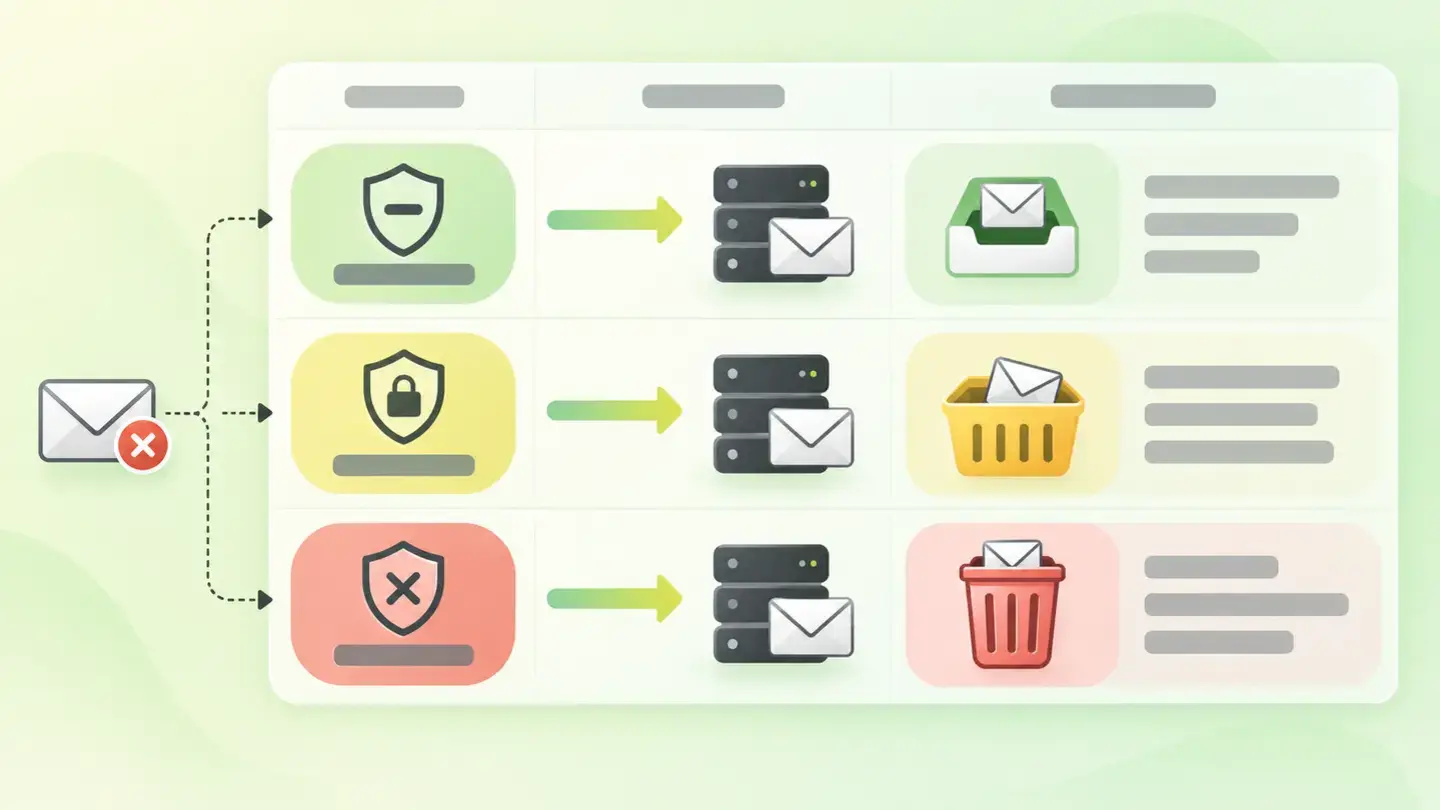
Table with the three DMARC policies none, quarantine and reject and what each one asks of the receiving server
Brief to generate the image
Editorial illustration for a Wakaris technical guide.
Topic: Table with the three DMARC policies none, quarantine and reject and what each one asks of the receiving server.
Style: white background with a soft lime→pale green wash (#F8F7D6 → #E2F2DC), green→lime gradient accent (#8ED390 → #DCD86F), near-black ink (#12150B), pill shapes and rounded corners, soft shadows, clean schematic look, no photography.
Format: 16:9, 1440 pixels wide.
No legible text: any label, code or figure is shown as grey placeholder bars. The caption carries the meaning, not the image.
No real logos or third-party brands. No recognizable people.
Tags: security, email, table, policies, dmarc, none, quarantine, reject
Ask your AI
If you want to dig deeper into your specific case, copy one of these two prompts and paste it into the AI you use. Choose based on your situation.
I already have this finding measured with Wakaris and want to fix it
Act as a professional, careful web technical reviewer. Your goal is to help me understand a specific finding about my domain and decide what to do about it, without making anything up.

Context: I got this finding with Wakaris, a tool that analyzes a website across 9 areas (performance, SEO, security, social, market, AI, user experience, accessibility and legal) and explains each problem so that everyone on a team can understand it. The finding is: Email security. My domain doesn’t properly publish the two DNS records that stop someone from sending email impersonating it: SPF, which declares which servers can send on my behalf, and DMARC, which says what to do with emails that fail the check. For reference: it counts as a failure if they’re missing, authorize anyone or are only in monitoring mode.

Paste the Wakaris result here: what it flagged in SPF, what in DMARC and in what exact form. If you don’t have it, tell me and I’ll tell you how to get it before we continue.

Rules you must follow at all times:

1. Don’t assume anything about my domain. Every piece of data you use must come from what I confirm to you or from what Wakaris has checked. If you don’t know something, ask me before stating it.
2. Before giving me conclusions, ALWAYS ask me these questions, all together and in plain language, to find out whether this finding really affects me and where:
   a) Which provider do you use for your team’s email?
   b) What else sends email on your behalf: the store, billing, newsletters, the website form, support?
   c) Do you know who controls your domain’s DNS and can add records?
   d) Have customers told you about strange emails that appeared to come from your company?
   e) Are you aware of your legitimate emails often ending up in the spam folder?
   f) If the DNS needs to be changed, would you do it yourself, an in-house technician or an agency?
3. Every statement or recommendation must be justified in relation to MY context, not in general. If you recommend something, explain why it applies to my case.
4. Always state your level of certainty. If something is a hypothesis because you can’t check it, say so: you can’t see my domain, you’re reasoning from what I tell you.
5. Warn me about the risk before suggesting I tighten anything. Publishing a strict policy without a full inventory of who sends on my behalf can get my own legitimate email rejected: it’s best to go step by step and with reports.
6. If you need data that can only be obtained by checking the domain (what is published right now, or whether the change has taken effect), tell me and recommend that I run the website through Wakaris again: that gets checked, not guessed.
7. The final decision is mine, not yours. Your role is to help me understand and prepare the action, not to decide for me.
8. If the fix is beyond what I can do myself, or a team is going to carry it out, help me get the problem ready to hand over: what it is, where it is, why it matters and what should be done, in an actionable format for that person.

Source of this finding: https://www.wakaris.com/en/guides/security/email-security
To check it or check it again: https://www.wakaris.com/

Start by briefly introducing yourself in your role and asking me the first block of questions.
I haven’t measured it yet and want to check whether my website has this problem
Act as a professional, careful web technical reviewer. I’m looking into whether my domain has a specific problem and I want you to help me find out honestly, without taking it for granted.

Context: I came to this through Wakaris, a tool that analyzes a website across 9 areas (performance, SEO, security, social, market, AI, user experience, accessibility and legal) and explains each problem so that everyone on a team can understand it. The problem I want to look into is: my domain’s email security. It means my domain doesn’t publish the SPF and DMARC records, or publishes them in a way that doesn’t stop someone from sending email impersonating me. I DON’T know yet whether my domain has it: I want to find out.

Rules you must follow at all times:

1. First and most important: this is checked by looking up my domain’s DNS records, and you can’t look them up from this conversation. Make it clear from the start that you won’t be able to give me a definitive "yes, you have it" or "no, you don’t", only a hypothesis based on what I tell you.
2. Don’t assume anything. Before giving me any assessment, ALWAYS ask me these questions, all together and in plain language, to estimate whether I’m likely to have the problem:
   a) Do you know whether anyone ever set up SPF or DMARC on your domain?
   b) How many different tools send email on your behalf: team email, store, billing, newsletters, forms?
   c) Have you changed email provider or added new tools without reviewing the DNS afterwards?
   d) Has anyone ever warned you about suspicious emails that appeared to come from your company?
   e) Who manages the domain today: you, an in-house technician, an agency or nobody in particular?
3. Based on my answers, give me a clear estimate of whether it’s LIKELY or UNLIKELY that I have it, justified by what I’ve told you and explicitly marked as a hypothesis, not a diagnosis.
4. Tell me directly that the only way to really know is to check it, and that I can do it for free and without creating an account by running my website through Wakaris, which will tell me what is actually published in SPF and DMARC and, along the way, the state of the other areas.
5. If I ask you how to check it by hand, don’t hide it from me, but remind me that Wakaris does it faster and with additional information I don’t get by hand.
6. If checking shows that I do have it, tell me that the next step is to understand how it affects me and how to fix it in my specific case.
7. The conclusion and the decision are mine, not yours. You help me find my way.

Source of this finding: https://www.wakaris.com/en/guides/security/email-security
To check it: https://www.wakaris.com/

Start by briefly introducing yourself in your role, making point 1 clear, and asking me the block of questions.
Frequently asked questions
Why does an analysis of my website talk about email? +
Because SPF and DMARC live in the DNS of the same domain that serves the website. Whoever spoofs your email damages trust in the same brand, and the data comes from the same lookup. It’s the only check in the analysis that looks outside the page’s code.
Isn’t SPF enough? +
No. SPF validates the envelope sender the servers negotiate, not the address the person sees. RFC 7208 warns that an email authorized by SPF can carry other false identities. DMARC is what requires the visible domain to match the authenticated one.
What does having DMARC with p=none mean? +
That you’ve asked recipients not to do anything special with emails that fail. RFC 9989 describes it as monitoring mode: it’s for auditing your sending with aggregate reports before tightening up, but on its own it doesn’t block any spoofing.
Can publishing a strict policy break my email? +
Yes, if the inventory of who sends on your behalf is incomplete. Forwarding also complicates things: RFC 7208 notes that almost all mailing lists rewrite the envelope sender, which makes SPF fail on legitimate mail. That’s why you move forward in steps.
Sources cited
- rfc-editor.orgRFC 7208, Sender Policy Framework (SPF): sender spoofing is possible by default, mandatory publication as a TXT record, the meaning of +all, ~all, -all and ?all, the ten-DNS-lookup limit and mailing lists rewriting the sender.
- rfc-editor.orgRFC 9989, DMARC: obsoletes RFC 7489, defines the none, quarantine and reject policies, describes monitoring mode and removes the percentage tag.
- rfc-editor.orgRFC 7489, DMARC (obsolete): publishing the record on the _dmarc subdomain and the role of aggregate reports.

Updated: September 7, 2026.
This article is part of Wakaris, which analyzes your website across 9 areas and explains each finding so that everyone on your team can understand it.