In short
What it checks
whether the page has a form, a phone or email link, or a button that leads to buying or booking.
Expected result
at least one conversion mechanism detectable in the page’s HTML.
Why it matters
without one, all incoming traffic leaves without a trace and nothing else can be measured.
Severity in Wakaris
Critical. Fails on 11% of the pages analyzed.

What this finding is and what it checks
A conversion is the moment a visit turns into something useful for you: a quote request, a call, an order, a booking, a subscription. The specific action varies by business, but the prerequisite is always the same: the page has to offer a way to do it.
That’s what this finding is about. Wakaris doesn’t judge whether your call to action is persuasive or whether the form converts a lot or a little. It checks something earlier and more basic: whether there’s at least one recognizable conversion mechanism on the page. The most common are three. A form, which in HTML is the <form> element, defined in the reference documentation as a section of the document with interactive controls for submitting information. A direct contact link, which uses the tel:, mailto: or sms: schemes instead of a web address. And a button or link that leads to a purchase or booking process.
If none appears, the page is a dead end: it can be read, but nobody can act from it.
How it’s detected
Wakaris loads the URL you give it and examines the resulting HTML looking for conversion mechanisms. The evidence it returns is single and binary: conversion mechanism, with a value of yes or no. When the value is no, the finding is marked with Critical severity. There are no intermediate grades or numeric threshold, because the question isn’t how many ways there are but whether there’s any.
What counts as a mechanism is based on what the HTML itself declares. A <form> with fields and a submit control is a working form; the reference documentation explains that when it’s submitted, the browser sends a request to the address in its action attribute. A link whose destination starts with tel: or mailto: is a direct contact route, and those schemes are recognized as valid values of the href attribute. A phone number written as plain text, on the other hand, isn’t a link: you can see it, but you can’t tap it.
The check is done on the specific page you analyze. An excellent contact page doesn’t save another page that doesn’t link to it or offer anything of its own.
Why it matters
It matters because conversion is the point where all the other work pays off. You can invest in search ranking, speed and design, but if the page offers no way to act, every visit ends with the back button and nothing to show for it.
Published performance data illustrates this well, precisely because it measures the effect on conversions. Google’s documentation cites the case of Rakuten 24, which by investing in its performance metrics increased its conversion rate by 33.13% and revenue per visitor by 53.37%, and Vodafone, which saw an 8% increase in sales from a 31% improvement in the load time of its main content. None of those figures would exist without a conversion mechanism to measure: the improvement shows because there’s a form or a checkout at the end.
There’s a second, less visible effect. Without a mechanism there’s no conversion event, and without an event your analytics can only count visits. You lose the one metric that connects the website to the business.
Common causes
The most frequent cause is design, not technology: the page was conceived to inform and nobody decided what readers should do when they finish. It happens a lot with blog articles and secondary service pages.
The second is that the mechanism exists, but not as one. The phone number is written as text and not as a tel: link. The email appears in an image to avoid spam, or as text without mailto:. The contact button is a visual element with no destination, which only reacts to code that runs later.
The third is that the form isn’t in the page’s HTML. It’s injected by an external code snippet, lives in an embedded frame, or is only built when someone clicks a tab. If that code fails or is slow, the page is left without it.
And the fourth is outsourcing it all: the only way to get in touch is an icon linking to a social profile. Visitors can reach you, but by leaving your website and with your brand out of the conversation.
How to fix it
Start by deciding, for that specific page, which action you want to prompt. One is enough. If you don’t know what it is, no code will fix the problem.
Then offer that action through a mechanism the HTML declares. If it’s a form, use a real <form>, with its action attribute pointing to the address that processes the submission, a post method if the data is personal, fields with their labels and a submit button. If it’s a call or an email, turn the text into a link: <a href="tel:+34..."> and <a href="mailto:...">, with link text that says where it leads. If it’s a purchase or a booking, the button has to be a link with a destination, not a decorative piece.
Check that the mechanism is in the initial HTML and doesn’t depend on other code drawing it later. And once you have it, run the page through Wakaris again: the finding should disappear, and along the way you’ll see whether the form meets what other findings require, such as labels on its fields and secure submission.
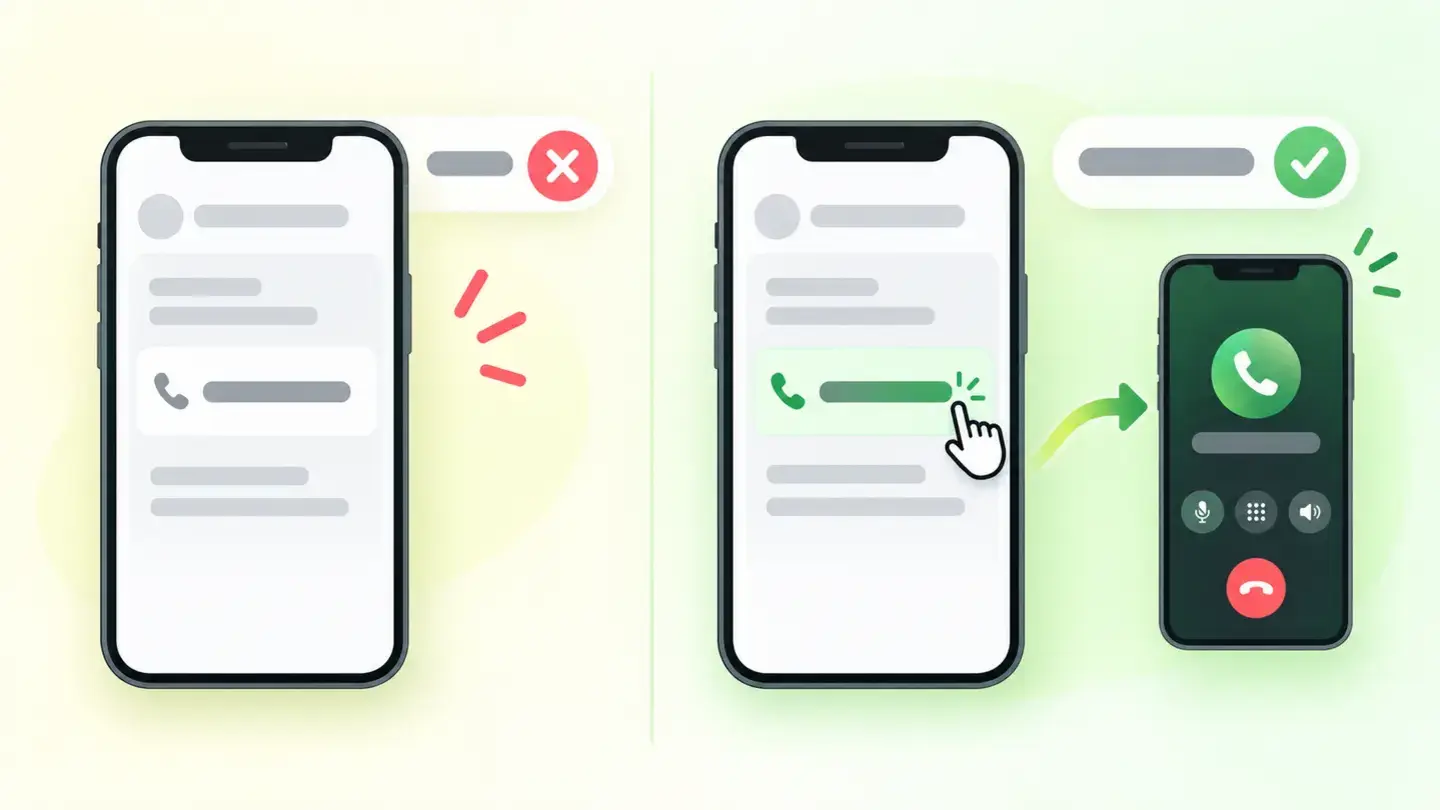
Comparison between a phone number written as plain text and the same number as a tel: link you can tap on mobile
Brief for generating the image
Editorial illustration for a Wakaris technical guide.
Topic: Comparison between a phone number written as plain text and the same number as a tel: link you can tap on mobile.
Style: white background with a soft lime→pale green wash (#F8F7D6 → #E2F2DC), green→lime gradient accent (#8ED390 → #DCD86F), near-black ink (#12150B), pill shapes and rounded corners, soft shadows, clean schematic look, no photography.
Format: 16:9, 1440 pixels wide.
No legible text: any label, code or figure is shown as gray placeholder bars. The caption carries the meaning, not the image.
No real logos or third-party brands. No recognizable people.
Tags: conversion actions, comparison, phone, plain text, link
Ask your AI
If you want to dig deeper into your specific case, copy one of these two prompts and paste it into the AI you use. Pick the one that fits your situation.
I already have the finding measured with Wakaris and want to fix it
Act as a professional, careful technical web reviewer. Your goal is to help me understand a specific finding about my website and decide what to do about it, without making anything up.

Context: I got this finding from Wakaris, a tool that analyzes a website across 9 areas (performance, SEO, security, social, market, AI, user experience, accessibility and legal) and explains each problem so that every profile on a team can understand it. The finding is: Conversion actions. The analyzed page offers no mechanism for visitors to act: no form, no phone or email link, no button that leads to buying or booking. Benchmark: one mechanism detectable in the page’s HTML is enough for the finding not to show up.

Paste the Wakaris result here: the analyzed page and the value of the "conversion mechanism" evidence. If you don’t have it, tell me and I’ll tell you how to get it before we continue.

Rules you must follow at all times:

1. Don’t assume anything about my website. Every piece of data you use must come from what I confirm to you or from what Wakaris has measured. If you don’t know something, ask me before stating it.
2. Before giving me any conclusions, ALWAYS ask me these questions, all together and in plain language, to find out whether this finding really affects me and where:
   a) What do you want people who land on that page to do: write to you, call you, buy, book, subscribe? If it’s several things, which is the main one?
   b) What platform is your website built on? (WordPress, Shopify, custom-built, other)
   c) Does the page already have something like a contact option: a written phone number or email, a button, a social media icon? Describe it to me.
   d) If there’s a form or a chat, is it added by an external service or built into the website itself?
   e) Is the page an article, a service or product page, a home page or something else?
   f) If the HTML needs changing, would you do it yourself, or would an in-house technician or an agency do it?
3. Every statement or recommendation must be justified in terms of MY context, not in general. If you recommend something, explain why it applies to my case.
4. Always state your level of certainty. If something is a hypothesis because you can’t measure it, say so: you can’t see my website, you’re reasoning from what I tell you.
5. Don’t suggest irreversible or risky technical changes (server configuration, deleting resources, direct changes in production) without first warning me about the risk and that a backup or a test environment is advisable.
6. If you need data that can only be obtained by analyzing the website (confirming the mechanism is in the HTML, or whether the fix worked), tell me and recommend that I run the page through Wakaris again: that gets checked, not guessed.
7. The final decision is mine, not yours. Your role is to help me understand and prepare the action, not to decide for me.
8. If the fix goes beyond what I can do myself, or a team will carry it out, help me get the problem ready to hand over: what it is, where it is, why it matters and what should be done, in a format that person can act on.

Source of this finding: https://www.wakaris.com/en/guides/marketing/conversion-actions
To check it or check it again: https://www.wakaris.com/

Start by briefly introducing yourself in your role and asking me the first set of questions.
I haven’t measured it yet and want to check whether my website has this problem
Act as a professional, careful technical web reviewer. I’m looking into whether my website has a specific problem, and I want you to help me find out honestly, without taking it for granted.

Context: I came to this through Wakaris, a tool that analyzes a website across 9 areas (performance, SEO, security, social, market, AI, user experience, accessibility and legal) and explains each problem so that every profile on a team can understand it. The problem I want to look into is: Conversion actions. It means a page offers no mechanism for visitors to act: no form, no phone or email link, no button that leads to buying or booking. One mechanism detectable in the HTML is enough for it not to be a problem. I DON’T know yet whether my website has it: I want to find out.

Rules you must follow at all times:

1. First and most important: this is CHECKED on the page’s real HTML, and you can’t see my website from this conversation. Make it clear from the start that you won’t be able to give me a definitive "yes, you have it" or "no, you don’t", only a hypothesis based on what I tell you.
2. Don’t assume anything. Before giving me any assessment, ALWAYS ask me these questions, all together and in plain language, to estimate whether I’m likely to have the problem:
   a) Which pages of your website concern you: the home page, service or product pages, blog articles, all of them?
   b) On those pages, is there a form visible without having to click anything first?
   c) If a phone number or email appears, can you tap it on mobile to call or write, or is it just text?
   d) Does the page’s main button lead somewhere when clicked, or does it only open something within the same page?
   e) Is the only way to contact you an icon linking to your social media?
   f) What platform is the website built on? (WordPress, Shopify, custom-built, other; or I don’t know)
3. Based on my answers, give me a clear estimate of whether it’s LIKELY or UNLIKELY that I have it, and on which pages it would be most likely, justified by what I’ve told you and explicitly marked as a hypothesis, not a diagnosis.
4. Tell me directly that the only way to really know is to check it, and that I can do it for free and without creating an account by running my website through Wakaris, which will tell me whether it detects a conversion mechanism on that page and, along the way, the status of the other areas.
5. If I ask you how to check it by hand, don’t hide it from me, but remind me that Wakaris does it faster, on the real page and with extra information I don’t get by hand.
6. If, once checked, it turns out I do have it, tell me the next step is to understand how it affects me and how to fix it in my specific case.
7. The conclusion and the decision are mine, not yours. You help me find my way.

Source of this finding: https://www.wakaris.com/en/guides/marketing/conversion-actions
To check it: https://www.wakaris.com/

Start by briefly introducing yourself in your role, making point 1 clear, and asking me the set of questions.
Frequently asked questions
Does an icon linking to my social media count as a conversion mechanism? +
Not as the main route. A link to a social profile takes visitors off your website and leaves the conversation on someone else’s platform. What counts as a mechanism is your own form, a tappable phone or email link, or a button that leads to buying or booking. Social media can complement, not replace.
My phone number is written on the page. Why does the finding show up? +
Because a number written as text isn’t a link. For it to be tappable and start a call, it has to be inside a link with the tel: scheme, just as an email needs mailto:. Both are recognized as valid link destinations in the HTML reference documentation.
Does every page on the website need a mechanism? +
The finding is checked page by page, so a page without a mechanism has it even if the contact page is flawless. You don’t need a form on every page: a clear link to the action is enough, such as a button that leads to contacting you or buying. What doesn’t work is offering nothing.
My form is added by an external service. Does Wakaris detect it? +
It depends on whether it ends up in the page’s HTML. If the service inserts a real <form>, it’s detected. If it lives in an embedded frame or is only built after an interaction, it may not show up. In that case, add a route of your own as a backup: an email or phone link is enough.
Sources cited
- developer.mozilla.org<form>: el elemento de formulario, MDN: definition of the element as a section with interactive controls for submitting information, and the
actionandmethodattributes. - developer.mozilla.org<a>: el elemento de enlace, MDN: the
tel:,mailto:andsms:schemes as validhrefvalues, and the recommendation for link text that indicates the destination. - web.devUse forms to get data from users, web.dev: how the browser sends a form’s data to the address in the
actionattribute and when to usepost. - web.devWhy does speed matter?, web.dev: the cases of Rakuten 24 (conversion +33.13%, revenue per visitor +53.37%) and Vodafone (sales +8%).

Updated: September 7, 2026.
This article is part of Wakaris, which analyzes your website across 9 areas and explains each finding so that every profile on your team can understand it.