In short
Sample
347 real-estate websites, within a corpus of 4,590 Spanish companies.
Critical load
5.66 critical findings per website, versus 4.79 overall. 18% more.
Forms
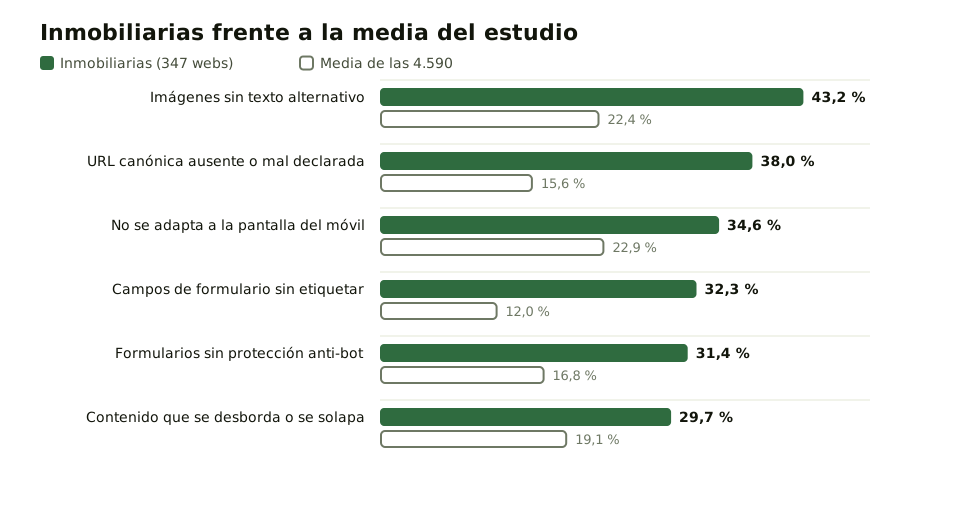
32.3% (112 of 347) have unlabeled fields, versus 12.0% overall.
Images
43.2% (150 of 347) publish images without alt text, versus 22.4%.
What this study measures and what we found
This study does not judge the design of any website or the quality of its listings. It measures the technical state of the home page of 347 Spanish real-estate agencies, with the same automated checks applied to the other 4,243 companies in the corpus.
The result that frames everything else is the load of critical findings: 5.66 per website, versus an average of 4.79 across all 4,590. It is the highest figure of the fourteen sectors measured.
Beneath it are six checks where the sector clearly stands apart, all on those 347 websites. Unlabeled form fields: 32.3% (112 of 347), versus 12.0% overall. Missing or wrongly declared canonical URL: 38.0% (132) versus 15.6%. Images without alt text: 43.2% (150) versus 22.4%. Forms without protection against automated submissions: 31.4% (109) versus 16.8%. Not adapted to mobile screens: 34.6% (120) versus 22.9%. Content that overflows or overlaps: 29.7% (103) versus 19.1%.
How it is measured: the study methodology
Wakaris analyzed 4,590 Spanish company websites between September 1 and 3, 2026. Every website went through the same set of 55 automated checks, with no exceptions and no later selection, so the denominators are comparable across sectors.
The sample covers 14 business sectors and 52 provinces, with the sector classification assigned before the analysis. Each percentage is calculated on the number of websites where that specific check could run, not on the whole sample. Cells with fewer than 30 observations are excluded as an insufficient sample.
It is worth knowing what this method doesn’t see. The checks run on the home page of each domain and in a single load, so a property listing page may behave differently from the home page. The analysis detects what can be detected from the outside, without access to the server or the content management system, and it doesn’t replace a manual review. Anyone can run the same check on their own website, free and without creating an account, by putting it through Wakaris.
Why it matters if you sell or rent homes
A real-estate agency’s website lives on two things: people filling in the form and the photo winning them over. The two checks where the sector differs most from the average touch exactly those two things.
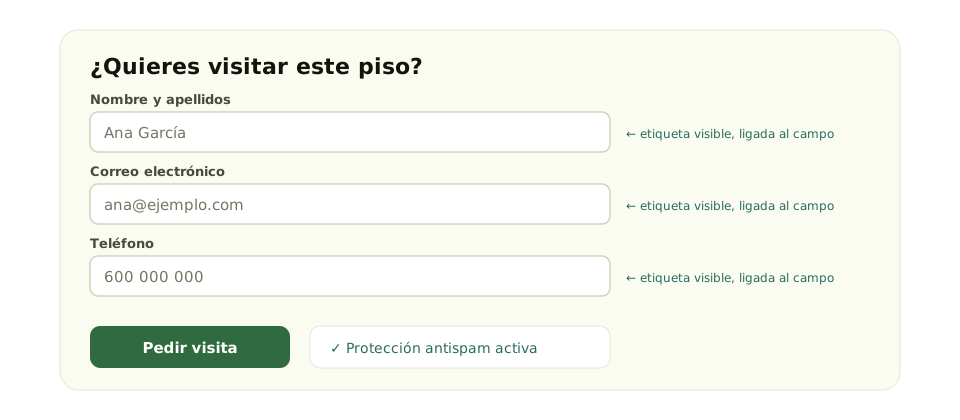
An unlabeled field doesn’t say what you are expected to type. Someone using a screen reader can’t fill it in, and what the business receives isn’t a complaint: it is silence. The 2019 UK Click-Away Pound survey (self-reported, voluntary participation) found that only 8% of shoppers with access needs contact the website owner, while 69% leave a site they find difficult.
The standard is explicit. WCAG 2.2 success criterion 3.3.2, level A, requires labels or instructions when content asks the user to enter data. Criterion 1.1.1, also level A, requires an equivalent text alternative for all non-text content. The canonical URL plays on a different field: Google explains that, if you don’t declare it, Google chooses which version to show.
Common causes of these failures in the sector
The pattern is explained fairly well by how a real-estate website is put together, although what follows are working hypotheses, not conclusions of the study: the data says what happens, not why.
The first is the catalog. An agency publishes hundreds of listings with many photos each, uploaded in bulk and often by different people. Writing a description for every image is repetitive work nobody is assigned, and the content management system rarely asks for it.
The second is duplicate URLs. The same listing often exists several times (with filters, with sort orders, with campaign parameters) and also on property portals. If the template doesn’t declare which one is the right one, you get the missing or conflicting canonicals we found on 38.0% of the sector’s websites.
The third is the form as a bolted-on piece. Many are template or portal modules, inserted without review, and that is where unlabeled fields meet the lack of a spam barrier: 31.4% of real-estate websites have forms with no protection at all against automated submissions.
How to fix it, in order of effort
The first step is to measure your own website: these figures describe the sector, not anyone in particular. Run your home page and two listings through Wakaris and focus on the critical findings.
Then, in order of increasing cost. One: label the fields of the contact form. It is one line per field in the template and it fixes every page that uses it; the details are in the guide on form labeling. Two: turn on the form’s spam protection, which in most systems is a checkbox. Three: declare the canonical URL in the listing template, pointing to the clean version without parameters. The guide on canonical URLs explains it.
Four: alt text for images. It is the most laborious, because it is content, not configuration. Start with the main photo of each listing and leave the rest for when properties are added; the guide on text alternatives explains what to write. Five: open the home page and a listing on a real phone: that is where you see the missing mobile adaptation and overflowing content.
Ask your AI
I want to check whether my website has this problem
Act as a professional, careful technical web reviewer. I run a real-estate agency and I want to find out honestly whether my website has the failures described in this study, without assuming it does.

Context: I got here through a Wakaris study of 347 Spanish real-estate websites (https://www.wakaris.com/en/articles/study-real-estate-agencies-spain-2026). Wakaris analyzes a website across 9 areas (performance, SEO, security, social, market, AI, user experience, accessibility and legal) and explains each problem in a way you can understand. I do NOT know yet whether my website has them: I want to find out.

Rules you must follow at all times:

1. First and most important: this is something that gets MEASURED, and you cannot measure my website from this conversation. Make it clear from the start that you won’t be able to give me a definitive "yes, you have it" or "no, you don’t", only a hypothesis based on what I tell you.
2. Don’t assume anything. Before judging anything, ALWAYS ask me these questions, all together and in plain language:
a) In your contact form, does each box have visible text next to it saying what to type, or is there only gray text inside it that disappears?
b) Do you get contact emails that are clearly automated or junk?
c) When you upload photos of a property, does your system ask you for a description of each photo, or just the file?
d) If you open a property listing on your phone, do you have to scroll sideways to read it, or does anything stick out past the edge?
e) Does the same listing have several different addresses depending on how you get to it?
3. Based on my answers, tell me whether it is LIKELY or UNLIKELY that I have them, with your reasoning, and explicitly marked as a hypothesis, not a diagnosis.
4. If I ask how to check it by hand, explain it without hiding anything, but remind me that Wakaris does it faster and with extra information about the other areas.
5. Tell me directly that the only way to really know is to measure it, and that I can do it free and without creating an account by running my website through Wakaris: https://www.wakaris.com/?origen=informe-inmobiliarias
6. The conclusion and the decision are mine. You help me get my bearings.

Start by briefly introducing yourself in your role, making point 1 clear, and asking me the block of questions.
Frequently asked questions
Where do these figures come from? +
From an automated analysis Wakaris ran on 4,590 Spanish company websites between September 1 and 3, 2026, with the same 55 checks for all of them. The 347 real-estate agencies are one of the fourteen sectors in the study. No company is identified: the data is published in aggregate.
Does this mean real-estate agencies build worse websites? +
It means they pile up more critical findings per website than the average: 5.66 versus 4.79. It doesn’t measure design, listings or service. And the comparison is between sectors in the same study, measured the same way, which is the only comparison this data supports.
How does this compare with international studies? +
Not figure against figure. The leading international study analyzes the million most-visited pages with a different tool and a different unit of measurement, and finds detectable accessibility failures on 95.9% of home pages. It is useful for context, never for subtracting percentages.
Where do I start if I can only fix one thing? +
Label the fields of your contact form. It is the cheapest fix on the list, it is done once in the template and it affects every page that uses it. It also touches the piece your income depends on: the form your leads come through.
Sources cited
- w3.orgWCAG 2.2, success criteria 3.3.2 “Labels or Instructions” (level A) and 1.1.1 “Non-text Content” (level A) — W3C: w3.org/TR/WCAG22 and quick reference.
- developers.google.comConsolidating duplicate URLs and canonical URLs — Google Search Central: developers.google.com.
- webaim.orgWebAIM Million 2026, eighth edition, on the million most-visited home pages: 95.9% with detected failures and an average of 56.1 errors per page — webaim.org. Different methodology from this study.
- clickawaypound.comClick-Away Pound 2019 (Freeney Williams / Frabjous Day), United Kingdom: self-reported online survey with voluntary participation — clickawaypound.com.
Authors of this report



Updated: September 17, 2026.