In short
What’s checked
how many H1s there are, whether the H1 has text, whether any headings are empty and whether the hierarchy moves forward without skipping levels.
Reference rule
a single H1 per page and levels that go down one at a time, according to the HTML documentation.
Why it matters
it’s the main way many people move through a long page without seeing it.
Severity in Wakaris
Important. It fails on 74.9% of the pages analyzed.
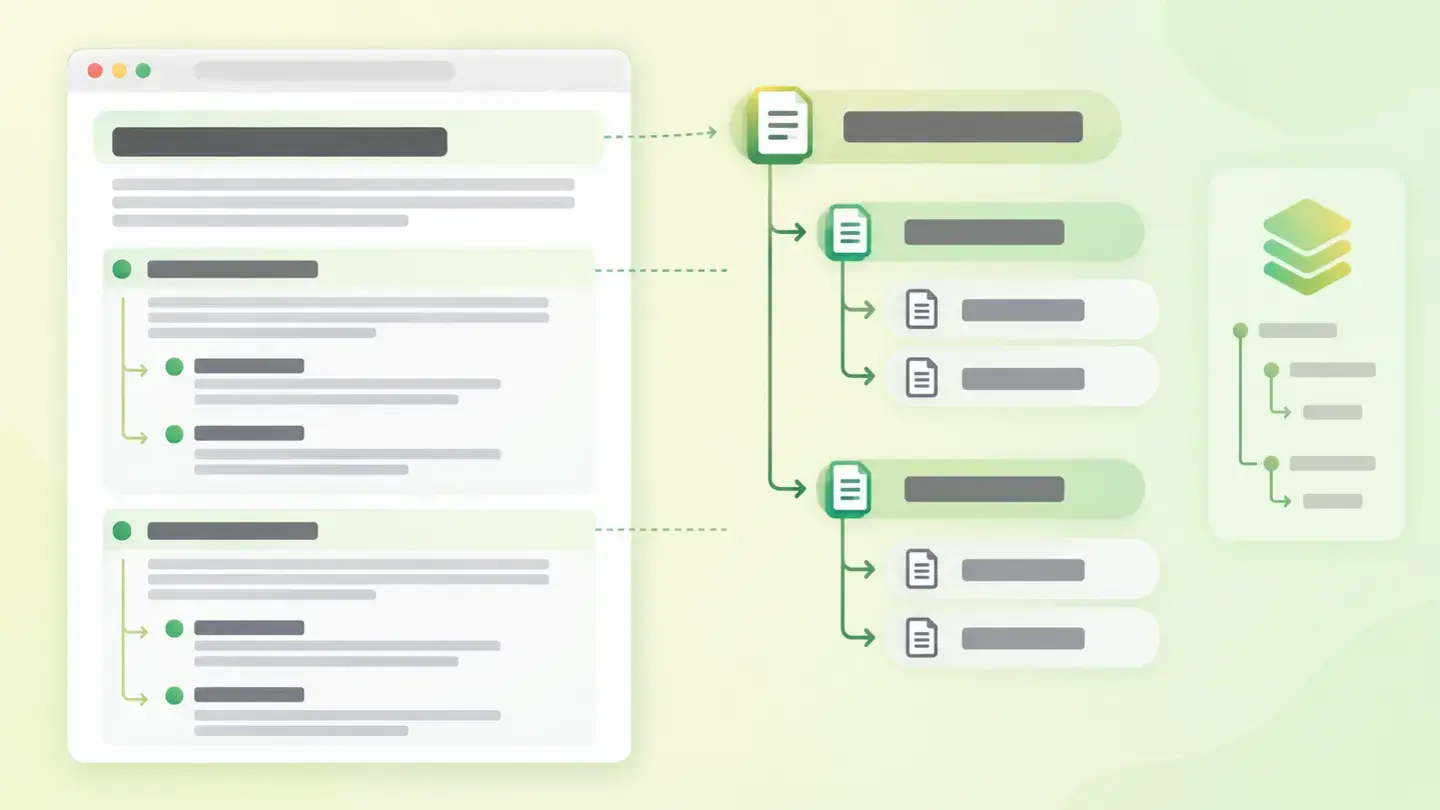
What this finding is and what it measures
A page’s headings aren’t just big text: they’re tags that declare the hierarchy of the content. HTML offers six levels, from H1 to H6. The H1 says what the whole page is about. An H2 opens a section. An H3 opens a subsection inside that H2.
This finding groups four checks on that outline. The first counts the H1s: the reference is exactly one, and the finding is triggered if there are none or several. The second checks whether that H1 has text or is empty. The third looks for empty headings in the rest of the page. The fourth reviews the hierarchy: no jumping from an H2 to an H4, and the page shouldn’t start at an intermediate level.
All four measure the same thing from different angles: whether the outline a machine reads matches the outline a person sees.
How it’s measured
Wakaris analyzes the HTML of the URL you give it and returns the four checks separately, with the H1 count and the list of problem headings, without installing anything. That’s the direct way to know where you stand.
The measurement is done on a specific page, not the whole site, and that matters more than it seems: in a shared template, the same hierarchy error shows up on hundreds of pages, but there are also individual pages with their own problem.
Two nuances on how to read the result. The H1 count is a number and allows an exact cut-off: anything other than one is a finding. The other three results are categories, not figures: a heading is either empty or not, the hierarchy either skips levels or doesn’t. And for empty headings, the report distinguishes whether the problem is isolated or widespread on the page, because the fix isn’t the same.
Why it matters
It matters mostly for comprehension, and it’s worth being precise about the split, because there’s a very widespread expectation here that doesn’t hold up.
The first front, and the real one: people who use a screen reader jump from heading to heading to find their way, and many screen readers generate an ordered list of all the headings on the page. If levels are missing, that list has gaps and the person wonders where the missing content is. If a heading is empty, the list includes a silent entry. And there’s an accessibility rule, at level AA, that requires headings to describe the topic or purpose: an empty one describes nothing.
The second front is SEO, and here we need to let some air out. Google recommends using headings so people can navigate the content, but says literally that from its search engine’s perspective it doesn’t matter if they’re out of order, and places the number and order of headings among the things you might think matter but shouldn’t focus on. Put simply: you fix this for people, not for ranking.
Common causes
Each of the four checks fails for different reasons, and knowing which one is yours saves half the work.
A duplicate H1 almost always comes from the template: the header logo sits inside an H1 and the page title brings its own. It also appears when a homepage block and a featured article use the same heading style.
A missing H1 is typical of pages built with a visual page builder, where the big heading is a text block with a large font size and no level assigned. It looks like a title, but it isn’t one.
Empty headings are usually leftovers: a tag left without text after editing, a decorative divider marked as a heading, or an H2 that only contains an icon with no text alternative.
Skipped levels are almost always a design decision: the level is chosen for the font size that comes with it, not for its position in the outline.
How to fix it
First, find out which of the four checks is failing, because the fix changes completely. Wakaris points out in the report which headings are involved, which is where any sensible decision starts.
In order of effort versus result. Keep a single H1 with the page’s real title and move the rest down to H2: if the logo was in an H1, make it normal text. Fill in or remove empty headings; if the element was decorative, remove its level and leave it as what it is. Reorder the levels so each one goes down by one, starting from the H1.
And the fix that prevents it from happening again: separate level from style. Choose the level based on where the content sits in the outline and control the size with the stylesheet, not by changing the tag. The HTML documentation puts it bluntly: don’t use headings to resize text. With that, the next redesign won’t break the hierarchy again.
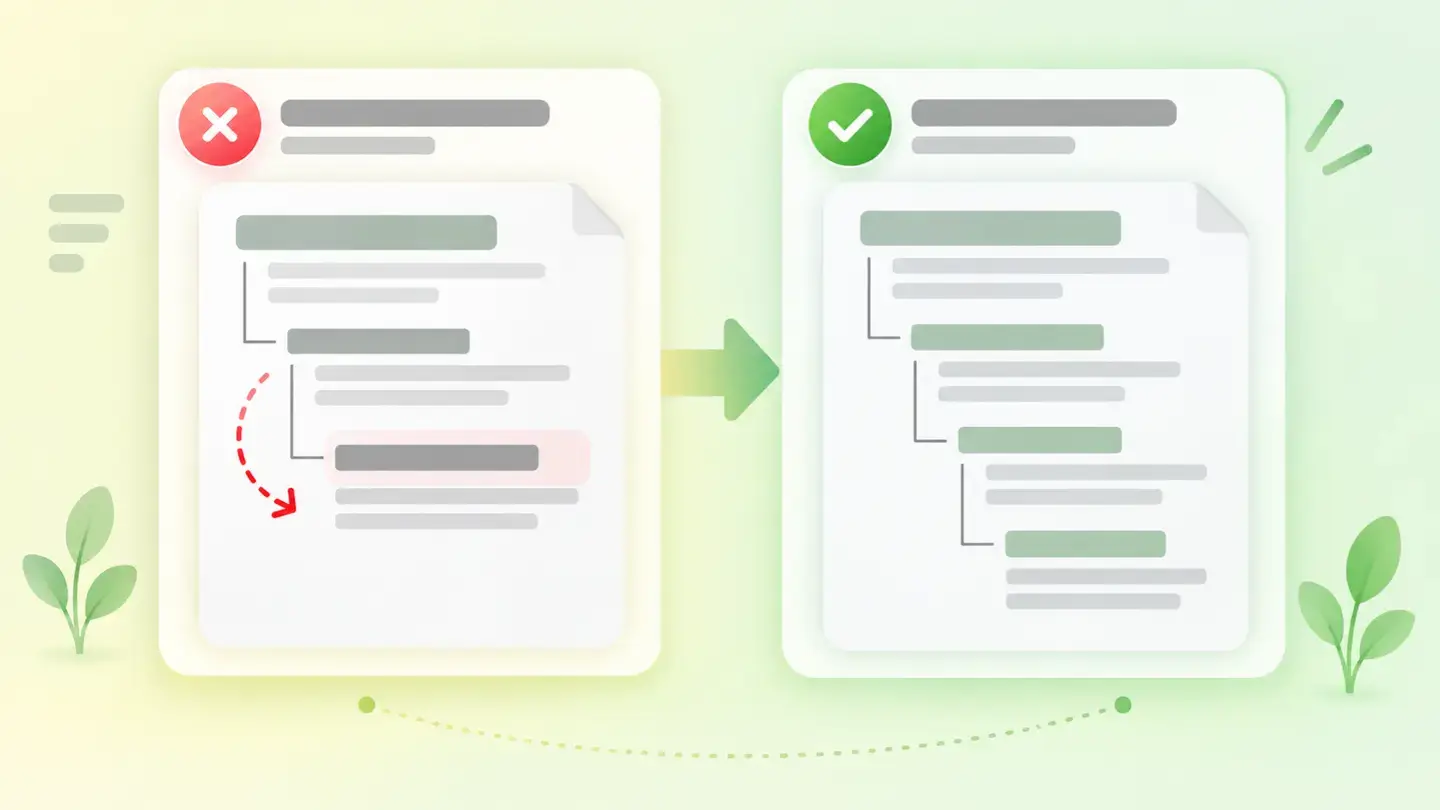
Comparison of two heading outlines, one with a jump from H2 to H4 and one with the correct hierarchy
Brief to generate the image
Editorial illustration for a Wakaris technical guide.
Topic: Comparison of two heading outlines, one with a jump from H2 to H4 and one with the correct hierarchy.
Style: white background with a soft lime→pale green wash (#F8F7D6 → #E2F2DC), green→lime gradient accent (#8ED390 → #DCD86F), near-black ink (#12150B), pill shapes and rounded corners, soft shadows, clean schematic look, no photography.
Format: 16:9, 1440 pixels wide.
No legible text: any label, code or figure is shown as gray placeholder bars. The caption carries the meaning, not the image.
No real logos or third-party brands. No recognizable people.
Tags: structure, headings, comparison, outlines, jump, hierarchy, correct
Ask your AI
If you want to dig into your specific case, copy one of these two prompts and paste it into the AI you use. Pick the one that fits your situation.
I already have the finding measured with Wakaris and want to fix it
Act as a professional, careful technical web analyst. Your goal is to help me understand a specific finding about my website and decide what to do about it, without making anything up.

Context: I got this finding from Wakaris, a tool that analyzes a website across 9 areas (performance, SEO, security, social, market, AI, user experience, accessibility and legal) and explains each problem so that every profile on a team can understand it. The finding is: Heading structure. It checks four things in the page’s heading outline: how many H1s there are (the reference is just one), whether the H1 has text, whether any headings are empty and whether the hierarchy of levels moves forward without skipping.

Paste the Wakaris result here: which check came up as a finding, with which specific headings and on which page. If you don’t have it, tell me and I’ll explain how to get it before we continue.

Rules you must follow at all times:

1. Don’t assume anything about my website. Every piece of data you use must come from what I confirm or what Wakaris has detected. If you don’t know something, ask me before stating it.
2. Before giving me conclusions, ALWAYS ask me these questions, all together and in plain language, to find out whether this finding really affects me and where:
   a) What platform is your website on? (WordPress, Shopify, custom-built, other)
   b) Of the four checks, which one came up as a finding: number of H1s, empty H1, empty headings or skipped levels?
   c) Does the problem appear on one page or on many? If it’s on many, it’s almost certainly in the template.
   d) Is there anything inside a heading that isn’t text: a logo, an icon, an image?
   e) How do you choose a heading’s level when writing: by what it means or by the font size it gives you?
   f) Can you edit the template and the stylesheet, or only the content of the pages?
   g) If a technical fix is needed, would you do it yourself, an in-house technician or an agency?
3. Every statement or recommendation must be reasoned in relation to MY context, not in general. If you recommend something, explain why it applies to my case.
4. Always flag your level of certainty. If something is a hypothesis because you can’t check it, say so: you can’t see my website, you’re reasoning about what I tell you.
5. Don’t suggest irreversible or risky technical changes (editing the live template, touching the global stylesheet) without first warning me about the risk and that a backup or test environment is advisable.
6. Be honest about the impact: if you tell me this will improve my Google position, you’re overdoing it. Explain the real effect on comprehension and accessibility, and don’t sell me ranking.
7. If you need data that can only be obtained by checking the website (which headings there are, in what order, or whether the fix worked), tell me and recommend that I run the page through Wakaris again: that gets checked, not guessed.
8. The final decision is mine, not yours. Your role is to help me understand and prepare the action, not to decide for me.
9. If the fix goes beyond what I can do myself, or a team will carry it out, help me get the problem ready to hand over: what it is, where it is, why it matters and what needs to be done, in an actionable format for that person.

Source for this finding: https://www.wakaris.com/en/guides/seo/heading-structure
To check it or check it again: https://www.wakaris.com/

Start by briefly introducing yourself in your role and asking me the first set of questions.
I haven’t measured it yet and want to check if my website has this problem
Act as a professional, careful technical web analyst. I’m looking into whether my website has a specific problem and I want you to help me find out honestly, without taking it for granted.

Context: I came across this through Wakaris, a tool that analyzes a website across 9 areas (performance, SEO, security, social, market, AI, user experience, accessibility and legal) and explains each problem so that every profile on a team can understand it. The problem I want to look into is: Heading structure. It checks whether there’s a single H1 with text, whether any headings are empty and whether heading levels go down one at a time without skipping any. I DON’T know yet whether my website has it: I want to find out.

Rules you must follow at all times:

1. First and most important: this is checked by reading the page’s code, and you can’t read my website from this conversation. Make it clear from the start that you won’t be able to give me a definitive "yes, you have it" or "no, you don’t", only a hypothesis based on what I tell you.
2. Don’t assume anything. Before giving me any assessment, ALWAYS ask me these questions, all together and in plain language, to estimate whether I’m likely to have the problem:
   a) Did you build your website with a visual page builder, or did someone code it?
   b) Is the logo in the header a standalone image, or is it inside a heading?
   c) When you write a page, do you choose "Heading 1", "Heading 2"… by what it means or by the font size that looks best?
   d) Do you have headings that are just an icon, a decorative line or blank space?
   e) Do you use the same big heading in several areas of the same page, for example on a homepage with featured blocks?
   f) Have you noticed gaps or empty entries in the table of contents or side menu your template generates?
   g) Do you know whether anyone in your audience uses a screen reader or navigates with the keyboard only?
3. Based on my answers, give me a clear estimate of whether it’s LIKELY or UNLIKELY that I have it, and which of the four checks would be the suspect, reasoned from what I’ve told you and explicitly marked as a hypothesis, not a diagnosis.
4. Tell me plainly that the only way to know for sure is to check it, and that I can do it for free and without creating an account by running my website through Wakaris, which will give me the number of H1s, the specific empty headings, the skipped levels and the status of the other areas too.
5. If I ask you how to check it by hand, don’t hide it from me, but remind me that Wakaris does it faster, on the real page and with additional information I don’t get by hand.
6. Don’t inflate the benefit. If I ask whether fixing this will move me up in Google, be honest: the effect is on comprehension and accessibility.
7. If checking shows that I do have it, tell me the next step is to understand how it affects me and how to fix it in my specific case.
8. The conclusion and the decision are mine, not yours. You help me find my bearings.

Source for this finding: https://www.wakaris.com/en/guides/seo/heading-structure
To check it: https://www.wakaris.com/

Start by briefly introducing yourself in your role, making point 1 clear, and asking me the set of questions.
Frequently asked questions
Can a page have more than one H1? +
The HTML standard allows it if they aren’t nested, but the documentation doesn’t consider it good practice: the recommended approach is a single H1 that describes the page, just like its title. Nesting several H1s inside sections is no longer conforming.
Is skipping a heading level a big deal? +
It’s best avoided. People who jump from heading to heading are left wondering where the missing level is. Skipping levels is fine when closing a subsection, though: an H4 can be followed by an H2 that opens a new section.
Will ordering my headings improve my Google ranking? +
Don’t count on it. Google recommends using headings so people can navigate the content, but states that the order doesn’t matter to its search engine, and lists the number and order of headings among the things you shouldn’t focus on.
What if my design needs a small heading in an important section? +
Then separate level from size. Assign the level that matches its place in the outline and give it whatever size you want in the stylesheet. Changing the tag to get a size breaks the hierarchy, and that can’t be recovered later.
Sources cited
- developer.mozilla.orgElementos de encabezado h1-h6, MDN Web Docs: six levels, a single H1 as good practice, nested H1s not conforming, not skipping levels, the ordered list of headings that screen readers generate and the rule of not using headings to resize text.
- web.devEstructura del contenido, web.dev: the order of levels as the main navigation route for assistive technology and the warning against creating headings with styles alone.
- w3.orgHeadings, W3C WAI: nesting by rank, that skipping ranks should be avoided, and that skipping them when closing a subsection is fine.
- w3.orgUnderstanding SC 2.4.6: Headings and Labels, W3C: level AA criterion requiring headings to describe the topic or purpose.
- developers.google.comSEO Starter Guide, Google Search Central: that headings are there for people to navigate, that order doesn’t matter to its search engine and that number and order are among the things not to focus on.

Updated: September 7, 2026.
This article is part of Wakaris, which analyzes your website across 9 areas and explains each finding so that every profile on your team can understand it.