In short
What it checks
the HTTP status code, blocking in robots.txt, the meta robots tag with noindex and the validity of the XML sitemap.
When it fails
when the URL redirects or returns an error, when robots.txt blocks it, when it carries noindex or when the sitemap isn’t valid.
Why it matters
Google documents that it doesn’t index URLs that return a 4xx error and removes the ones it already had from the index.
Severity in Wakaris
Critical. Fails on only 0.5% of the pages analyzed, but when it fails the page doesn’t exist for the search engine.
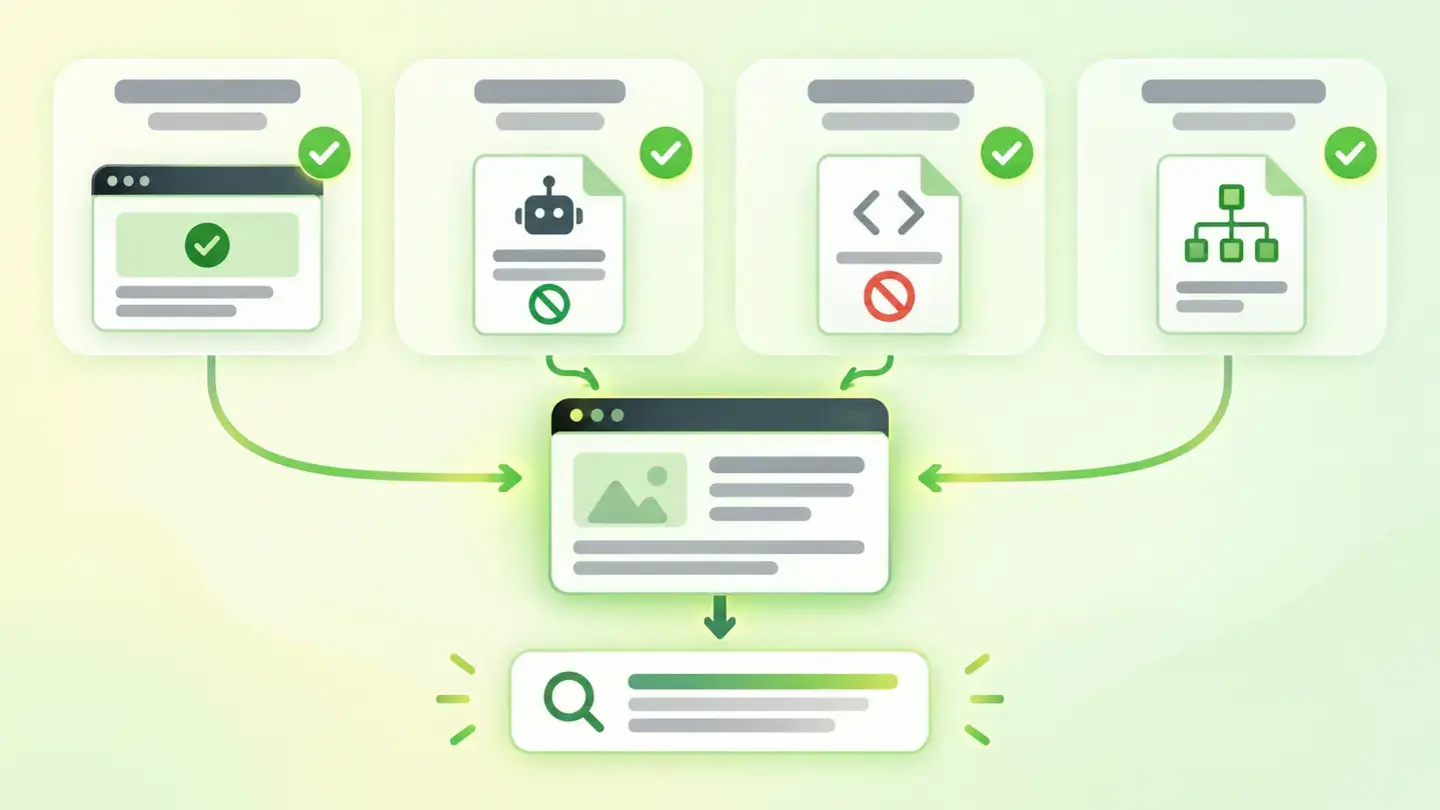
What this finding is and what it checks
This finding shows up when the page doesn’t meet a condition the search engine needs to include it in its index, the list of pages it knows and can show. What isn’t in it doesn’t rank.
Wakaris reviews four things. The first is the HTTP status code, the server’s numeric response: 200 means it serves the page, 3xx that it redirects, 4xx that it can’t find it or forbids it and 5xx that it has failed. The second is blocking in robots.txt, the file at the root of the domain that tells crawlers which paths they can request. The third is the meta robots tag with a noindex value, which asks the search engine not to store the page. The fourth is that the XML sitemap, the list of URLs offered to search engines, exists and is valid. It only takes one of the four to fail for indexability to be compromised.
How it’s checked
Wakaris requests the URL you give it just as a crawler would and records what happens with the four conditions, with nothing to install. The report tells you which status code the server returned, whether the path is blocked in robots.txt, whether the page carries noindex and whether the XML sitemap exists and is well formed. Each condition is a separate piece of evidence, with the URL and the code snippet that backs it up.
It’s worth understanding why all four are looked at together. Google documents that robots.txt isn’t a mechanism for keeping a page out of its search engine: a blocked URL can still be indexed if other sites link to it. And it documents the opposite for noindex: for the tag to work, the page can’t be blocked in robots.txt, because if the crawler can’t get in it will never see the instruction. A setting that looks right on its own can cancel out another. And the check is on a specific URL: the home page may be fine and a product page not.
Why it matters
It’s a binary problem: a non-indexable page doesn’t lose positions, it loses the chance to have any.
Google is explicit about status codes. It doesn’t index URLs that return a 4xx code, and those it had already indexed that start returning one are removed from the index. With 5xx errors the effect is slower but ends the same way: crawlers slow down, and already indexed URLs are kept for a while and eventually drop out. With redirects, Google follows up to 10 hops, but processes the destination’s content, not that of the requested URL.
The other front is instructions. A noindex left over from the staging version, or an overly broad Disallow in robots.txt, can keep entire sections out of the search engine without anyone noticing, because the website looks fine in the browser. That’s the dangerous trait of this finding: everything works for people and nothing works for the search engine. That’s why it has Critical severity in Wakaris even though it’s rare: when it happens, all other improvements are useless.
Common causes
The most repeated cause is a noindex left over from the development stage. Staging environments are marked with noindex, and on launch nobody removes the tag, or the CMS keeps the option to ask search engines not to index the site switched on.
The second is a robots.txt too generous with Disallow: blocking a whole folder to hide a few internal files also shuts out the pages that hang from it. Google documents that without robots.txt everything is allowed: the problem is never that it’s missing, but that it forbids too much.
The third is status codes: pages that were moved and now redirect in a chain, old URLs that return 404 but are still linked, or a server that responds 5xx under load just as the crawler comes by.
The fourth is the sitemap: a file with relative URLs, not in UTF-8 or above the 50 MB or 50,000 URLs that Google sets per file. It doesn’t block indexing, but it takes away the list that helps the search engine discover your pages.
How to fix it
Start with the Wakaris report, which tells you which of the four conditions fails, because the fix is different in each case.
If it’s the status code, make the URL respond 200 directly: point chained redirects to the final destination, fix links to pages that return 404 and review 5xx errors with whoever manages the server.
If it’s robots.txt, narrow the Disallow rules to what you really want to hide; Google documents that an Allow rule can override a broader Disallow for a specific path.
If it’s noindex, remove it from the meta robots tag or the X-Robots-Tag header on the pages you do want in the search engine, and check they aren’t also blocked in robots.txt, because then the instruction won’t even be read.
If it’s the sitemap, generate one with absolute URLs, in UTF-8 and within the limits, and declare its path in robots.txt with a Sitemap: line. Then run the URL through Wakaris again to confirm all four conditions are clean.
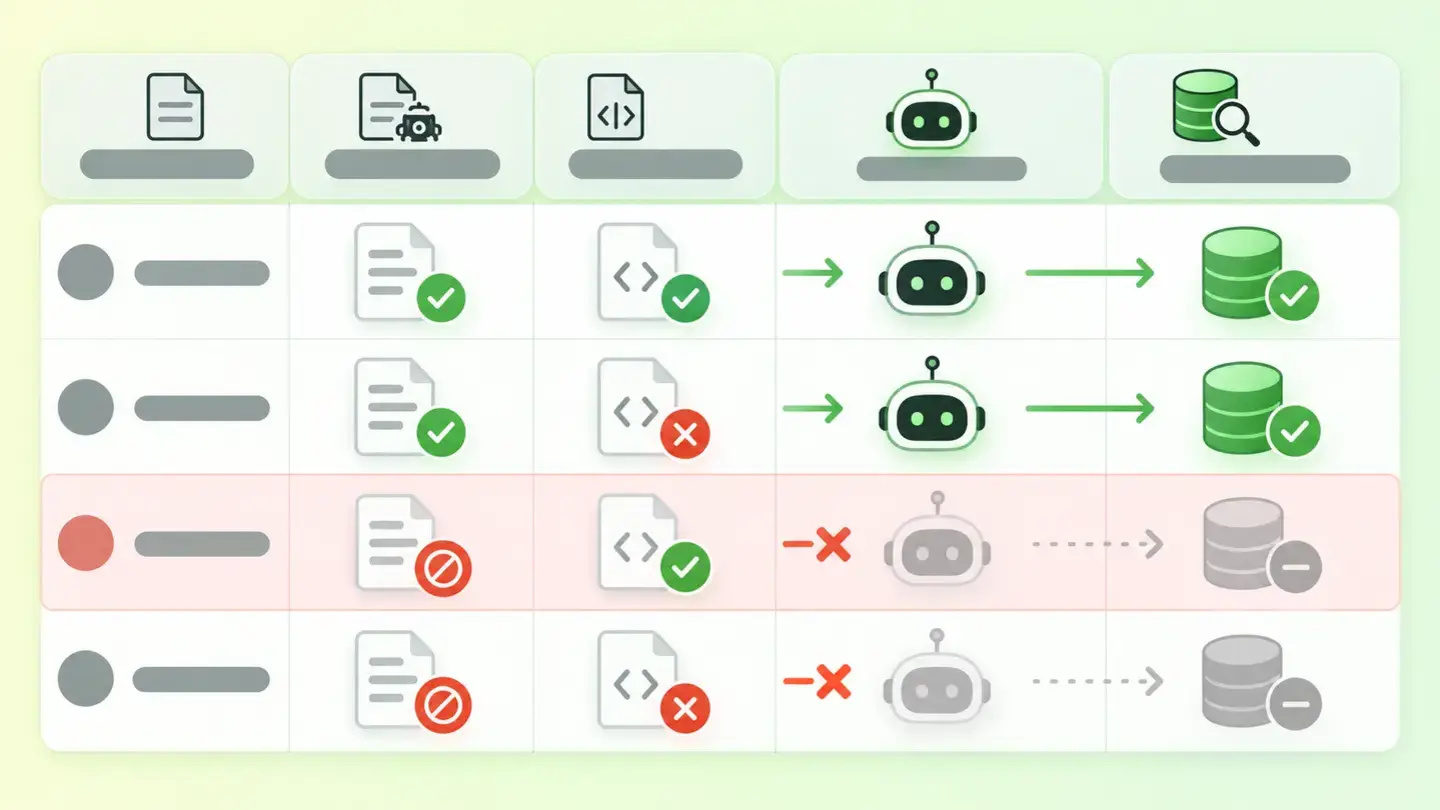
Table crossing the two instructions, Disallow in robots.txt and noindex on the page, showing that a blocked page never gets its noindex read
Brief for generating the image
Editorial illustration for a Wakaris technical guide.
Topic: Table crossing the two instructions, Disallow in robots.txt and noindex on the page, showing that a blocked page never gets its noindex read.
Style: white background with a soft lime→pale green wash (#F8F7D6 → #E2F2DC), green→lime gradient accent (#8ED390 → #DCD86F), near-black ink (#12150B), pill shapes and rounded corners, soft shadows, clean schematic look, no photography.
Format: 16:9, 1440 pixels wide.
No legible text: any label, code or figure is shown as gray placeholder bars. The caption carries the meaning, not the image.
No real logos or third-party brands. No recognizable people.
Tags: indexability, table, instructions, disallow, robots, txt, noindex
Ask your AI
If you want to dig deeper into your specific case, copy one of these two prompts and paste it into the AI you use. Pick the one that fits your situation.
I already have the finding measured with Wakaris and want to fix it
Act as a professional, careful technical web reviewer. Your goal is to help me understand a specific finding about my website and decide what to do about it, without making anything up.

Context: I got this finding from Wakaris, a tool that analyzes a website across 9 areas (performance, SEO, security, social, market, AI, user experience, accessibility and legal) and explains each problem so that every profile on a team can understand it. The finding is: Indexability. My page doesn’t meet one of the conditions for getting into Google’s index: the server doesn’t serve it with a 200 code (it redirects or returns an error), robots.txt blocks it, it carries the noindex tag or the XML sitemap isn’t valid. Benchmark: the URL should respond 200, not be blocked in robots.txt, not carry noindex and be listed in a valid sitemap, with absolute URLs and in UTF-8.

Paste the Wakaris result here: which condition fails (status code, robots.txt, noindex or sitemap), with what value and on which page. If you don’t have it, tell me and I’ll tell you how to get it before we continue.

Rules you must follow at all times:

1. Don’t assume anything about my website. Every piece of data you use must come from what I confirm to you or from what Wakaris has measured. If you don’t know something, ask me before stating it.
2. Before giving me any conclusions, ALWAYS ask me these questions, all together and in plain language, to find out whether this finding really affects me and where:
   a) What platform is your website built on? (WordPress, Shopify, custom-built, other)
   b) Which condition failed: the status code, blocking in robots.txt, the noindex tag or the sitemap? If several, tell me which.
   c) Is the affected page one you want to appear on Google, or is it an internal, test or admin page?
   d) Has the website recently gone through a migration, a domain change or a launch from a staging environment?
   e) Do you know whether your CMS has an option like "discourage search engines from indexing this site" switched on?
   f) Do you control the server or hosting, or is it a managed service?
   g) If a technical fix is needed, would you do it yourself, or would an in-house technician or an agency do it?
3. Every statement or recommendation must be justified in terms of MY context, not in general. If you recommend something, explain why it applies to my case.
4. Always state your level of certainty. If something is a hypothesis because you can’t check it, say so: you can’t see my website, you’re reasoning from what I tell you.
5. Don’t suggest irreversible or risky technical changes (editing robots.txt blindly, changing server redirects, direct changes in production) without first warning me about the risk and that a backup or a test environment is advisable.
6. If you need data that can only be obtained by checking the website (confirming the actual status code, the contents of robots.txt, or whether the fix worked), tell me and recommend that I run the page through Wakaris again: that gets checked, not guessed.
7. The final decision is mine, not yours. Your role is to help me understand and prepare the action, not to decide for me.
8. If the fix goes beyond what I can do myself, or a team will carry it out, help me get the problem ready to hand over: what it is, where it is, why it matters and what should be done, in a format that person can act on.

Source of this finding: https://www.wakaris.com/en/guides/seo/indexability
To check it or check it again: https://www.wakaris.com/

Start by briefly introducing yourself in your role and asking me the first set of questions.
I haven’t measured it yet and want to check whether my website has this problem
Act as a professional, careful technical web reviewer. I’m looking into whether my website has a specific problem, and I want you to help me find out honestly, without taking it for granted.

Context: I came to this through Wakaris, a tool that analyzes a website across 9 areas (performance, SEO, security, social, market, AI, user experience, accessibility and legal) and explains each problem so that every profile on a team can understand it. The problem I want to look into is: Indexability. It means a page can’t get into Google’s index because the server doesn’t serve it with a 200 code, because robots.txt blocks it, because it carries the noindex tag or because the XML sitemap isn’t valid. I DON’T know yet whether my website has it: I want to find out.

Rules you must follow at all times:

1. First and most important: this is CHECKED by requesting the page as a crawler would, and you can’t do that from this conversation. Make it clear from the start that you won’t be able to give me a definitive "yes, you have it" or "no, you don’t", only a hypothesis based on what I tell you.
2. Don’t assume anything. Before giving me any assessment, ALWAYS ask me these questions, all together and in plain language, to estimate whether I’m likely to have the problem:
   a) If you search Google for your website’s name or an exact phrase from one of your pages, does it appear?
   b) Was the website launched recently, or has it recently changed domain, platform or address structure?
   c) Was there a test or development version before it was launched?
   d) Has anyone ever touched the robots.txt file or a "search engine visibility" option in the CMS?
   e) Do you have old pages that no longer exist but are still linked from others?
   f) What platform is the website built on? (WordPress, Shopify, custom-built, other; or I don’t know)
3. Based on my answers, give me a clear estimate of whether it’s LIKELY or UNLIKELY that I have it, and which of the four conditions would be the suspect, justified by what I’ve told you and explicitly marked as a hypothesis, not a diagnosis.
4. Tell me directly that the only way to really know is to check it, and that I can do it for free and without creating an account by running my website through Wakaris, which will give me the actual status code, the result for robots.txt, noindex and sitemap, and, along the way, the status of the other areas.
5. If I ask you how to check it by hand, don’t hide it from me, but remind me that Wakaris does it faster, on the real page and with extra information I don’t get by hand.
6. If, once checked, it turns out I do have it, tell me the next step is to understand how it affects me and how to fix it in my specific case.
7. The conclusion and the decision are mine, not yours. You help me find my way.

Source of this finding: https://www.wakaris.com/en/guides/seo/indexability
To check it: https://www.wakaris.com/

Start by briefly introducing yourself in your role, making point 1 clear, and asking me the set of questions.
Frequently asked questions
Is blocking a page in robots.txt enough to keep it off Google? +
No. Google documents that robots.txt isn’t a mechanism for keeping a page out of the search engine: if other sites link to it, it can still be indexed even if it’s blocked. To get it out of the index you need to use noindex or protect it with a password, and let the crawler in to read the instruction.
What’s the difference between noindex and Disallow? +
Disallow, in robots.txt, stops the crawler from requesting the page. noindex, in the meta robots tag or the X-Robots-Tag header, lets it in but asks it not to store the page. They don’t add up: if the page is blocked, the crawler will never see the noindex and the URL may keep appearing.
Does my website need a sitemap? +
It depends on size and linking. Google says a website of about 500 pages or fewer that’s well linked internally may not need one. It helps discover URLs, especially on large or new sites or those with few external links, but it doesn’t guarantee that everything in it will be crawled and indexed.
Does a redirect count as an indexability failure? +
Wakaris records it because the analyzed URL doesn’t respond 200, but sends you to another one. Google follows up to 10 hops and treats a 301 redirect as a strong signal that it should process the destination, so a single well-made redirect isn’t serious. Long chains and temporary redirects that should be permanent are.
Sources cited
- developers.google.comIntroduction to robots.txt, Google Search Central: robots.txt isn’t a mechanism for keeping a page out of Google; a blocked URL can be indexed if other sites link to it.
- developers.google.comHow to write and submit a robots.txt file, Google Search Central: location at the host root, meaning of Disallow and Allow, and full permission without robots.txt.
- developers.google.comBlock Search indexing with noindex, Google Search Central: meta robots and X-Robots-Tag syntax; noindex only works if the page isn’t blocked in robots.txt.
- developers.google.comHTTP status codes, and network and DNS errors, Google Search Central: handling of 2xx, 3xx, 4xx and 5xx, and the 10 redirect hops.
- developers.google.comLearn about sitemaps, Google Search Central: when a sitemap is needed and that it doesn’t guarantee indexing.
- developers.google.comBuild and submit a sitemap, Google Search Central: limits of 50 MB and 50,000 URLs, UTF-8, absolute URLs and the Sitemap line in robots.txt.

Updated: September 7, 2026.
This article is part of Wakaris, which analyzes your website across 9 areas and explains each finding so that every profile on your team can understand it.