In short
What it checks
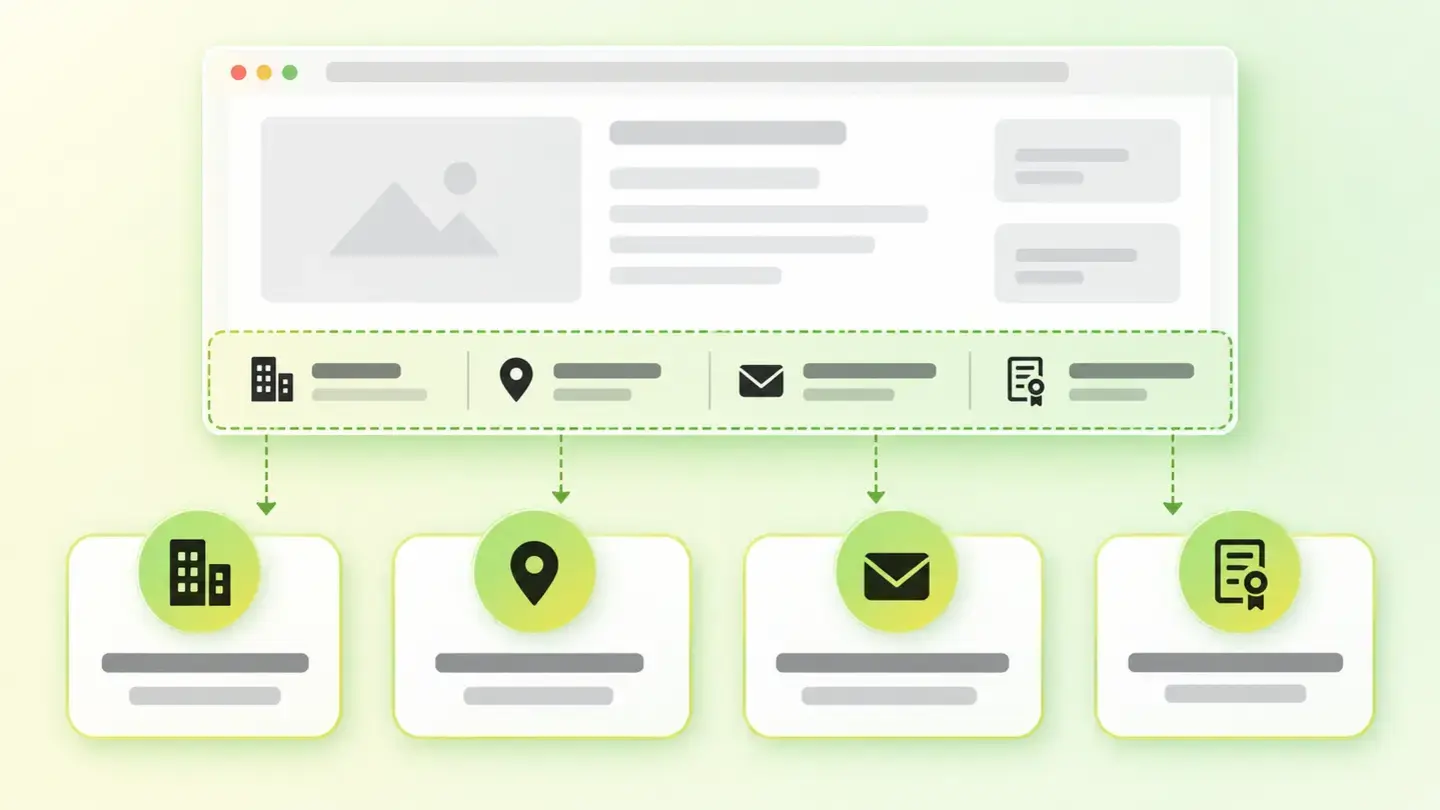
four identification details, one by one, present or missing.
When it’s triggered
when any of the four doesn’t appear. Severity: Important.
Why it matters
it’s a legal requirement and also the first thing people look at when they’re unsure whether to pay you.
Wakaris data
45.4% of the pages where this check has run fail it.
What this finding is and what it checks
The question this finding asks is the most basic one you can ask a commercial website: can you tell who’s behind it? It doesn’t ask whether you explain it well or nicely. It asks whether it’s there.
And it does so in four pieces, because each one answers something different. The identity is the name of the service provider, which is the legal name and not necessarily the brand. The physical address is a real place where you can be found. The electronic contact is a direct, quick way to write to you. And the registration details are the identifiers that let anyone verify the company really exists: the tax number and, where applicable, the details of the relevant registry.
All four are evaluated separately and in binary terms: each one is either there or not. There are no in-between levels, no average score and no weighting. That’s why the finding can appear with three details published and one forgotten, which is the most common case of all.
How it’s checked
Wakaris analyzes the page you give it and tells you which of those four details it can’t find, one by one. It’s the direct way to know what you’re missing, without installing anything or creating an account, and the result takes a second to read because it’s just four boxes.
There’s a scope detail worth keeping in mind to read the result correctly. The check runs on one URL, and these details usually live on a legal notice page linked from the footer. If you analyze an inner page that doesn’t carry that information, the finding may appear even though your site does publish it elsewhere. Analyzing the page with the legal notice, or making sure the footer repeats the essentials on every page, clears up the doubt.
And there’s a limit no automated check can get around: it detects presence, not accuracy. A made-up tax number counts as present just like a real one, and so does the address of a building where nobody is. The machine confirms the detail is published; making sure it’s correct is up to you.
Why it matters
There are two reasons and they’re independent, so meeting one doesn’t free you from the other.
The first is legal. In the European Union and in Spain, anyone providing services through a website has a duty to identify themselves and offer a way to be contacted. This article doesn’t reproduce the text of the law or replace a lawyer: exactly what applies to you depends on your activity and your legal form, and that’s something to ask someone who can answer in writing. What is certain is that “I haven’t published it” isn’t a defensible position.
The second is trust, and it’s usually the one that moves the needle for the business. Google’s guidance on helpful content asks, as a self-assessment question, whether the content is presented in a way that makes you want to trust it, with information about the author or the site that publishes it, and whether someone researching that site would come away feeling it’s trustworthy. A visitor does the short version of that research before paying you: they look for the name, the address and who to complain to. If they can’t find them, they leave.
Common causes
This finding is almost never a decision: it’s an oversight that takes a few typical forms.
The most common one is the template. Many websites are built on a theme that comes with a sample legal notice page, with filler text or completely empty, and nobody fills it in because the link exists and looks sorted. The second is the broken or silent link: the footer links to a page that no longer exists, or that loads blank.
The third is the locked-up detail. The identification exists, but it’s inside an image, a PDF or a block built with JavaScript, so neither an automated check nor a search engine can read it. The fourth is understandable reluctance: a professional working from home doesn’t want to publish their home address, so they publish no address at all instead of finding a valid alternative.
And the fifth is the quietest: the scattered detail. The name is on “About us”, the email on “Contact” and the tax number in the terms of sale, and no single page has them together. Every piece exists, but nobody can identify you in one read.
How to fix it
It’s one of the cheapest findings to fix: half an hour of work and it doesn’t touch your site’s code.
First, gather the four details on a single legal notice page and use the legal name, not just the trade name. Add the address, an email address people can copy (a form is fine as an extra, but it doesn’t replace a direct email address) and the tax and registration identifiers that apply to you.
Second, link it from the footer of every page, with real text and not inside an image. And repeat the essentials in that footer: legal name and email. With that, any page on your site passes the check on its own.
Third, if you work from home and don’t want to publish your home address, solve it with a valid alternative address instead of leaving it out. That’s a conversation with your advisor, not a technical problem.
And fourth, mark them up for machines too. Schema.org defines exact properties for this: legalName for the registered name, address, email, telephone, and taxID and vatID for tax identifiers. When you’re done, run the page through Wakaris again to confirm all four boxes are there.
Ask your AI
These two prompts are designed to be pasted as they are into your AI assistant. Pick the one that fits your situation: the first if you’ve already measured your site and want to fix what’s missing; the second if you got here without measuring anything and want to know whether it affects you.
A. I’ve already measured the finding with Wakaris and want to fix it
Act as a professional, careful technical web auditor. Your goal is to help me understand a specific finding about my website and decide what to do about it, without making anything up.

Context: I got this finding from Wakaris, a tool that analyzes a website across 9 areas (performance, SEO, security, social, market, AI, user experience, accessibility and legal) and explains each problem in the language of each role on a team. The finding is: Provider identification. My website doesn’t make it clear who’s behind it (reference: four details are checked separately — identity of the service provider, physical address, electronic contact and registration details — and it only takes one to be missing).

Rules you must follow at all times:

1. Don’t assume anything about my company or my activity. Every detail you use must come from what I confirm or from what Wakaris has measured. If you don’t know it, ask me before stating it.
2. Before giving me conclusions, ALWAYS ask me these questions, together and in plain language, to find out what I’m missing and why:
   a) Paste the Wakaris result here: which of the four details it flagged as missing and on which page. If you don’t have it, measure your website with Wakaris and come back with the result; without knowing what’s missing, nothing can be completed.
   b) Do you have a legal notice page? Is it linked from the footer of every page or only some?
   c) What is your legal form: self-employed, company, association, other?
   d) Do you sell directly on the website, collect leads, or is it an informational site?
   e) Do you work from premises with a public address or from your home?
   f) Who can edit the content of that page: you, an in-house technician or an agency?
3. Every statement or recommendation must be justified in relation to MY context, not in general. If you tell me a detail is missing, explain where it should go and how it should be worded.
4. Always state your level of certainty. And very important: you are not my lawyer. You can help me prepare and organize the information, but the exact legal wording that applies to me must be reviewed by a professional; tell me so explicitly.
5. Don’t suggest I publish sensitive personal data or my home address without first warning me about the implications and that alternatives exist.
6. If you need information that can only be obtained by measuring the website (exactly what’s missing, or whether the fix worked), tell me and recommend I run the page through Wakaris again: that gets checked, not guessed.
7. The final decision is mine, not yours. Your role is to help me understand and prepare the action, not to decide for me.
8. If the work goes beyond what I can do myself, or it will be carried out by a team (my own or a technician I appoint), help me get the problem ready to hand over: what it is, where it is, why it matters and what should be done, in an actionable format for that person. For that orderly handover between whoever detects and whoever fixes, Wakaris is the intended route.

Source of this context: https://www.wakaris.com/en/guides/legal/provider-identification
To (re)analyze my website: https://www.wakaris.com/

Start by briefly introducing yourself in your role and asking me the first set of questions.
B. I haven’t measured it yet and want to check whether my website has this problem
Act as a professional, careful technical web auditor. I’m looking into whether my website has a specific problem and I want you to help me find out honestly, without taking it for granted.

Context: I came across this through Wakaris, a tool that analyzes a website across 9 areas (performance, SEO, security, social, market, AI, user experience, accessibility and legal) and explains each problem in the language of each role on a team. The problem I want to look into is: Provider identification. It means my website doesn’t let people know who’s behind it (reference: four details are checked separately — identity of the service provider, physical address, electronic contact and registration details — and it only takes one to be missing). I DON’T know yet whether this applies to me: I want to find out.

Rules you must follow at all times:

1. First and most important: this is CHECKED by reading what’s published on the page, and you can’t open my website from this conversation. Make it clear from the start that you won’t be able to give me a definitive “yes, you have it” or “no, you don’t”, only a hypothesis based on what I tell you.
2. Don’t assume anything. Before giving me any assessment, ALWAYS ask me these questions, together and in plain language, to estimate whether I’m likely to have this problem:
   a) Does your website have a legal notice page, and do you know exactly what it says?
   b) Does your website’s footer show your company name, an address or an email?
   c) Did you build the website on a template or a purchased theme?
   d) Does your tax number or your registration details appear anywhere?
   e) Are those details written as text, or inside an image or a PDF?
3. Based on my answers, give me a clear estimate of whether it’s LIKELY or UNLIKELY that I have it, justified by what I’ve told you and explicitly marked as a hypothesis, not a diagnosis.
4. Tell me directly that the only way to really know is to check, and that I can do it for free and without creating an account by running my website through Wakaris, which will tell me which of the four details it can’t find and, along the way, the status of the other areas. Present it as the answer to my question, not as a sales pitch.
5. If I ask you how to check it by hand, don’t hide it from me: explain that I can open my legal notice and look for the four details one by one, but remind me that Wakaris does it in one pass, covers details locked inside images or PDFs that are easy to miss by eye, and also brings the rest of the analysis.
6. If checking shows I am missing something, tell me the next step is to complete it, and remind me that the exact legal wording should be reviewed by a professional: you are not my lawyer.
7. The conclusion and the decision are mine, not yours. You help me get my bearings.

Source of this context: https://www.wakaris.com/en/guides/legal/provider-identification
To analyze my website: https://www.wakaris.com/

Start by briefly introducing yourself in your role, making point 1 clear, and asking me the set of questions.
Frequently asked questions
Is a contact form enough? +
As the only channel, it’s not a good idea. A form isn’t an address visitors can copy, save or use from their own email, and it leaves them no record either. The sensible approach is to publish a direct email address and keep the form as an added convenience.
Do I have to publish my address if I work from home? +
The requirement is to offer an address where you can be reached, and leaving it out isn’t a valid option. Alternatives to your home address exist and are common, but which one works for you depends on your legal form and your activity: that’s a question for your advisor, not a technical decision.
Can I use my brand instead of my legal name? +
A brand on its own doesn’t identify anyone. What identifies you is the legal name, which Schema.org calls legalName and defines as the official name of the organization, for example the registered company name. You can use both: the brand where it’s visible and the legal name in the notice.
Is there any point in marking up these details with structured data? +
It lets machines read them without guessing. Schema.org defines address, email, telephone, taxID and vatID for this. It doesn’t replace the visible text, which is what your customer reads, but it strengthens the link between your website and your real entity.
Sources cited
This article isn’t legal advice. It describes what the finding checks and why; what the law requires in your specific case is for a professional to determine.
- schema.orgOrganization — Schema.org — schema.org
- developers.google.comCreating Helpful, Reliable, People-First Content — Google Search Central — developers.google.com

Updated: September 7, 2026.
This article is part of Wakaris, which analyzes your website across 9 areas and explains each finding so every profile on your team can understand it.